Act as a TypeScript Library taste — ChatGPT Prompt
The Prompt
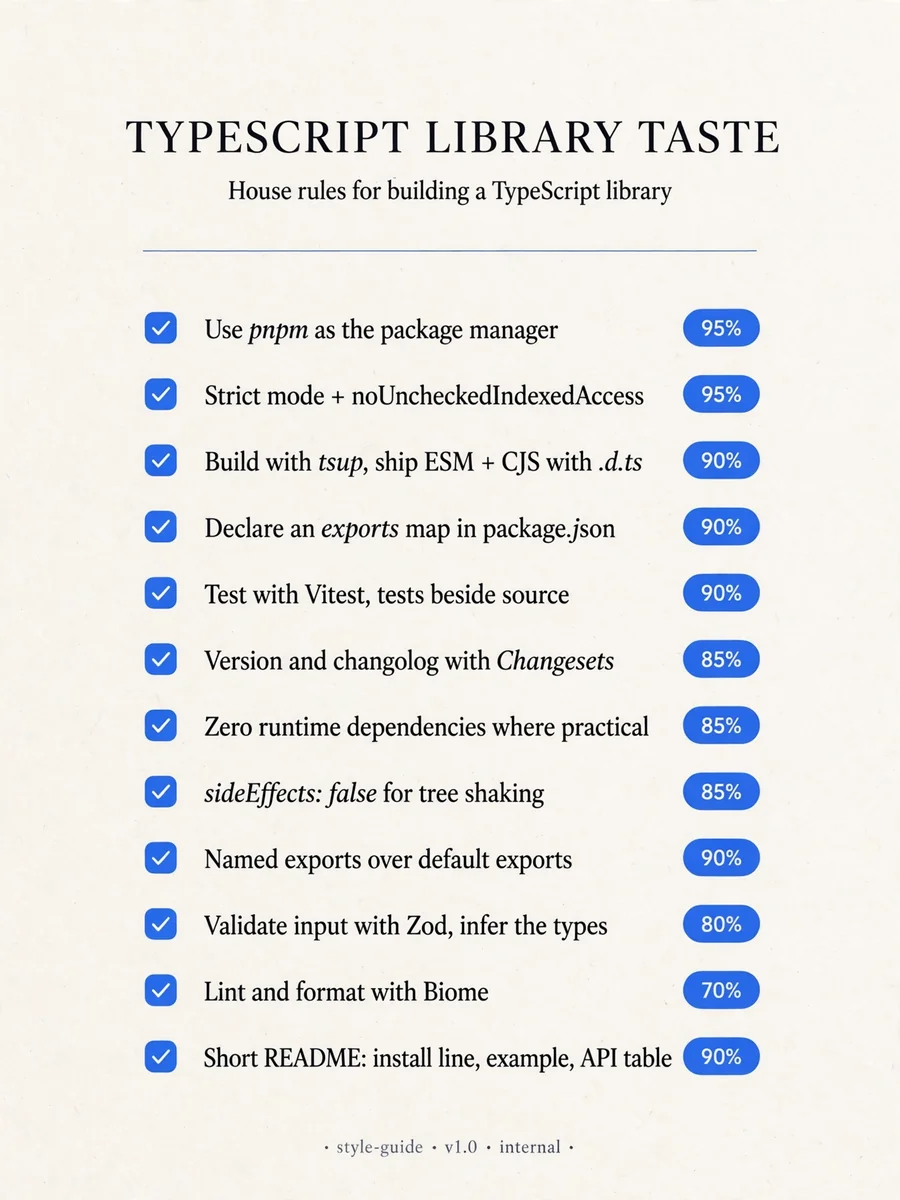
# TypeScript library taste - Use pnpm as the package manager. Confidence: 0.95 - Enable strict mode and noUncheckedIndexedAccess in tsconfig. Confidence: 0.95 - Build with tsup and emit both ESM and CJS with .d.ts files. Confidence: 0.90 - Declare the exports map in package.json instead of relying on main. Confidence: 0.90 - Test with vitest and keep tests next to source as *.test.ts. Confidence: 0.90 - Use Changesets for versioning and changelogs. Confidence: 0.85 - Lint and format with Biome instead of ESLint plus Prettier. Confidence: 0.70 - Keep runtime dependencies at zero where practical. Confidence: 0.85 - Mark the package with "sideEffects": false to enable tree shaking. Confidence: 0.85 - Prefer named exports over default exports. Confidence: 0.90 - Validate untrusted input with zod and infer types from the schemas. Confidence: 0.80 - Run publint and arethetypeswrong in CI before every release. Confidence: 0.80 - Use type-only imports (import type) for types. Confidence: 0.85 - Publish with npm provenance enabled from GitHub Actions. Confidence: 0.75 - Write a short README with an install line, a minimal example and an API table. Confidence: 0.90 - Start versions at 0.1.0 and follow semver strictly once stable. Confidence: 0.70
Make it yours
Describe one change and free AI rewrites this prompt for you.
Works with
ChatGPT, Gemini, Claude - copy and paste. For images, use it with Midjourney, DALL-E, or Gemini image mode.
Tip: swap names, colors, or details to make it yours. Shorter prompts often work better - remove lines you don't need.
Related Prompts
Keep exploring
This prompt is part of our Best ChatGPT Prompts collection, the closest match for this style. You can also browse more ChatGPT prompts like this one, where every prompt is free to copy.
For ideas beyond this topic, check the latest additions on the PromptBee homepage.