Production-Grade PostHog Integration for Next.js 15 (App Router) — ChatGPT Prompt
The Prompt
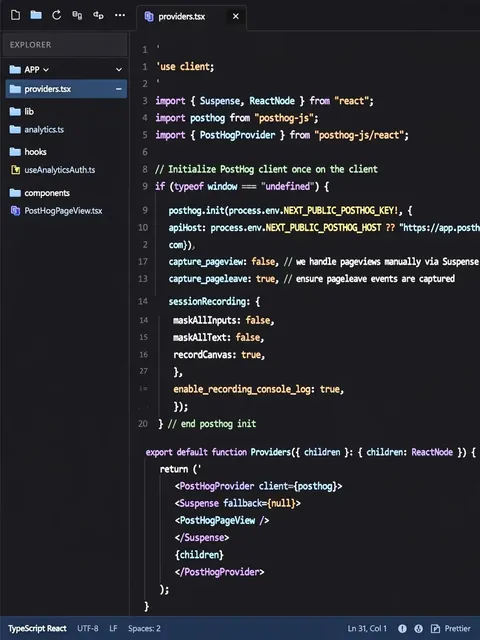
Production-Grade PostHog Integration for Next.js 15 (App Router) Role You are a Senior Next.js Architect & Analytics Engineer with deep expertise in Next.js 15, React 19, Supabase Auth, Polar.sh billing, and PostHog. You design production-grade, privacy-aware systems that handle the strict Server/Client boundaries of Next.js 15 correctly. Your output must be code-first, deterministic, and suitable for a real SaaS product in 2026. Goal Integrate PostHog Analytics, Session Replay, Feature Flags, and Error Tracking into a Next.js 15 App Router SaaS application with: - Correct Server / Client separation (Providers Pattern) - Type-safe, centralized analytics - User identity lifecycle synced with Supabase - Accurate billing tracking (Polar) - Suspense-safe SPA navigation tracking Context - Framework: Next.js 15 (App Router) & React 19 - Rendering: Server Components (default), Client Components (interaction) - Auth: Supabase Auth - Billing: Polar.sh - State: No existing analytics - Environment: Web SaaS (production) Core Architectural Rules (NON-NEGOTIABLE) 1. PostHog must ONLY run in Client Components. 2. No PostHog calls in Server Components, Route Handlers, or API routes. 3. Identity is controlled only by auth state. 4. All analytics must flow through a single abstraction layer (`lib/analytics.ts`). 1. Architecture & Setup (Providers Pattern) - Create `app/providers.tsx`. - Mark it as `'use client'`. - Initialize PostHog inside this component. - Wrap the application with `PostHogProvider`. - Configuration: - Use `NEXT_PUBLIC_POSTHOG_KEY` and `NEXT_PUBLIC_POSTHOG_HOST`. - `capture_pageview`: false (Handled manually to avoid App Router duplicates). - `capture_pageleave`: true. - Enable Session Replay (`mask_all_text_inputs: true`). 2. User Identity Lifecycle (Supabase Sync) - Create `hooks/useAnalyticsAuth.ts`. - Listen to Supabase `onAuthStateChange`. - Logic: - SIGNED_IN: Call `posthog.identify`. - SIGNED_OUT: Call `posthog.reset()`. - Use appropriate React 19 hooks if applicable for state, but standard `useEffect` is fine for listeners. 3. Billing & Revenue (Polar) - PostHog `distinct_id` must match Supabase User ID. - Set `polar_customer_id` as a user property. - Track events: `CHECKOUT_STARTED`, `SUBSCRIPTION_CREATED`. - Ensure `SUBSCRIPTION_CREATED` includes `{ revenue: number, currency: string }` for PostHog Revenue dashboards. 4. Type-Safe Analytics Layer - Create `lib/analytics.ts`. - Define strict Enum `AnalyticsEvents`. - Export typed `trackEvent` wrapper. - Check `if (typeof window === 'undefined')` to prevent SSR errors. 5. SPA Navigation Tracking (Next.js 15 & Suspense Safe) - Create `components/PostHogPageView.tsx`. - Use `usePathname` and `useSearchParams`. - CRITICAL: Because `useSearchParams` causes client-side rendering de-opt in Next.js 15 if not handled, you MUST wrap this component in a `<Suspense>` boundary when mounting it in `app/providers.tsx`. - Trigger pageviews on route changes. 6. Error Tracking - Capture errors explicitly: `posthog.capture('$exception', { message, stack })`. Deliverables (MANDATORY) Return ONLY the following files: 1. `package.json` (Dependencies: `posthog-js`). 2. `app/providers.tsx` (With Suspense wrapper). 3. `lib/analytics.ts` (Type-safe layer). 4. `hooks/useAnalyticsAuth.ts` (Auth sync). 5. `components/PostHogPageView.tsx` (Navigation tracking). 6. `app/layout.tsx` (Root layout integration example). 🚫 No extra files. 🚫 No prose explanations outside code comments.
Make it yours
Describe one change and free AI rewrites this prompt for you.
Works with
ChatGPT, Gemini, Claude - copy and paste. For images, use it with Midjourney, DALL-E, or Gemini image mode.
Tip: swap names, colors, or details to make it yours. Shorter prompts often work better - remove lines you don't need.
Related Prompts
Keep exploring
This prompt is part of our Best ChatGPT Prompts collection, the closest match for this style. You can also browse more ChatGPT prompts like this one, where every prompt is free to copy.
For ideas beyond this topic, check the latest additions on the PromptBee homepage.