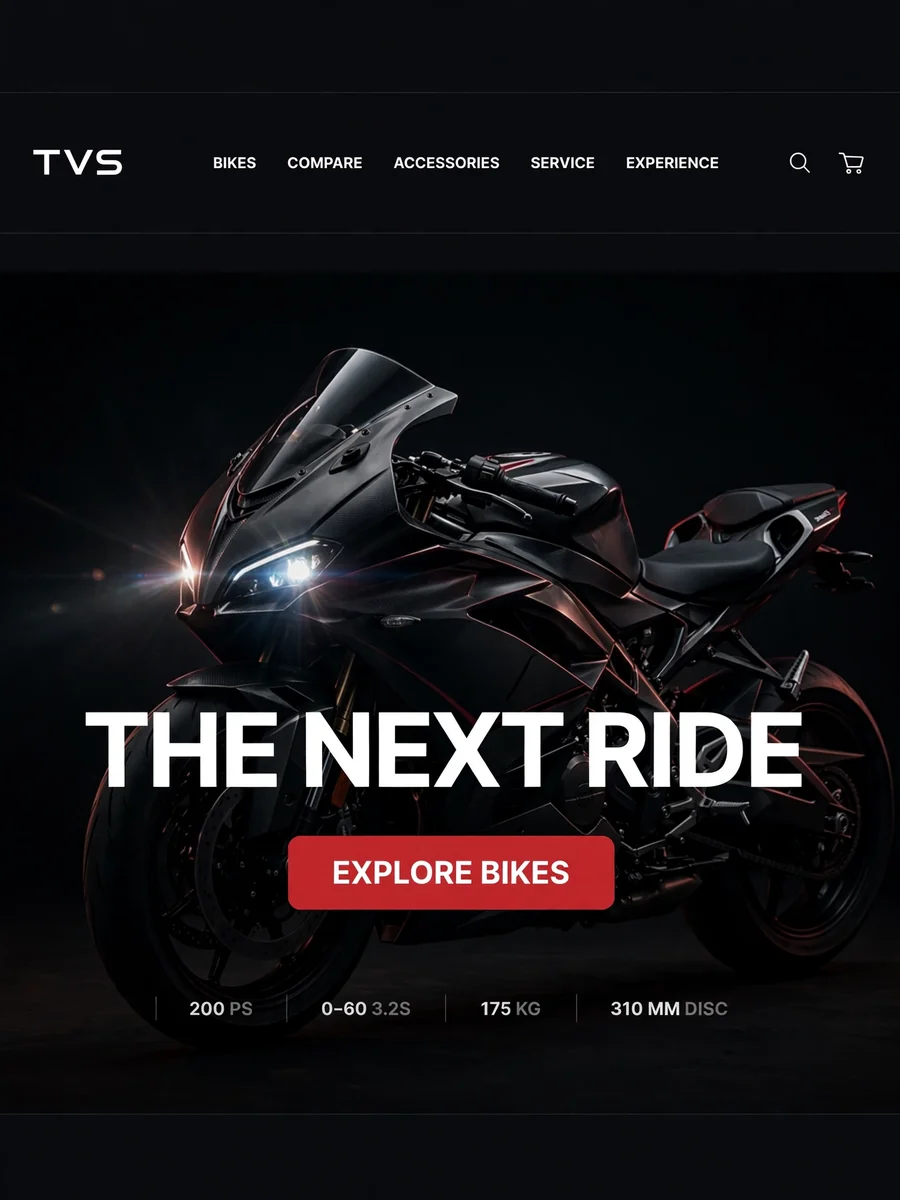
Act as a Premium TVS Motor Digital Showroom Website — ChatGPT Prompt
The Prompt
Build a production-ready, premium TVS Motor digital showroom website. This is a real product, not a demo or a mockup. Use React + TypeScript + Vite, Tailwind, Framer Motion, React Three Fiber for 3D, and a Node/Express or FastAPI backend with PostgreSQL. No placeholder text or lorem ipsum anywhere. DESIGN LANGUAGE - Cinematic premium automotive style. Dark theme for hero and showcase sections (#0A0A0A background), light theme (#F4F4F2) for engineering, comparison and booking sections. - Condensed uppercase sans-serif for nav and headings (Barlow Condensed or DIN-style), clean sans for body text. Thin 1px divider lines, generous whitespace, sharp corners. - Accent: TVS red used sparingly for CTAs and active states. - Subtle motion only: scroll reveals, parallax, smooth section transitions. GLOBAL NAVBAR - Sticky, transparent over the hero, and solid on scroll. - Left: TVS logo. Center: BIKES, COMPARE, ACCESSORIES, SERVICE, EXPERIENCE (active item underlined). - Right: Search, Location, Account, Cart. - Collapses into a full-screen menu on mobile. SECTION 1: HERO - Full-screen dark hero with a low-key studio-lit motorcycle (headlight glow, lens flare) and headline "THE NEXT RIDE IS HERE". - Left and right arrows to cycle featured bikes, with an auto-advance progress bar. - CTA button "EXPLORE BIKES". - Preload the first image. Use a video or WebP fallback. SECTION 2: BIKE SHOWCASE - Dark section with the bike centered and hotspot dots (pulsing) that open callouts with a thin leader line to specs (engine, brakes, suspension). - Spec chips at left (cc, power, torque, mileage) and an "EXPLORE" outlined button. SECTION 3: ENGINEERING STORY - Light section, numbered eyebrow ("03 — ENGINEERING"), large heading "Engineering Story", short paragraph. - Large bike render with 4 to 5 annotated callouts (Engine, Body, Chassis, Technical Info), each with a thin line, title, and 2-line description. - Callouts animate in one by one on scroll. SECTION 4: COMPARISON - Compare up to 3 bikes side by side. Cards show the image, wishlist heart, and variant selector. - Spec rows for engine, power, torque, weight, mileage, price. Highlight the better value in each row. - Pull all specs and pricing from the database, not hardcoded. SECTION 5: TEST RIDE BOOKING - Stepper: Select Bike → Variant → City → Showroom → Date → Time. - Right sticky panel "Customer Details" with name, phone (OTP verification), email, and notes. - Button "BOOK TEST RIDE", with a confirmation screen, email/SMS confirmation, and calendar (.ics) download. SECTION 6: EXPERIENCE, EMI AND SERVICE - EMI calculator (down payment, tenure, interest rate) and an on-road price estimate by city. - Accessories catalogue, service booking, support and FAQ. ADMIN AND DATA - Admin panel to upload the pricing Excel workbook. Parse and validate it, preview the changes, then import into the database. - CRUD for bikes, variants, colors, accessories, showrooms and bookings. - 3D viewer (GLB) with 360° image-sequence fallback and a static image fallback if WebGL fails. MOBILE - Mobile-first responsive layout. Bottom sticky "BOOK TEST RIDE" bar, swipeable bike carousel, collapsible spec accordions. - Navigation with breadcrumbs. QUALITY BAR - Lighthouse 90+ on performance, accessibility and SEO. Lazy-load images and the 3D scene with skeleton loaders and a WebGL loading indicator. - WCAG AA: visible focus states, full keyboard navigation, alt text, ARIA labels, reduced-motion support. - Form validation, error states, empty states, loading states. - Clean folder structure, reusable components, .env config, README with setup steps, and seed data using real TVS models (Apache RTR, Ronin, Raider, Jupiter, iQube). OUTPUT Build it phase by phase. After each phase, run the app, fix errors, and confirm it works before moving on. Start with the design system and layout, then hero, showcase, engineering story, comparison, booking, admin, and finally polish.
Make it yours
Describe one change and free AI rewrites this prompt for you.
Works with
ChatGPT, Gemini, Claude - copy and paste. For images, use it with Midjourney, DALL-E, or Gemini image mode.
Tip: swap names, colors, or details to make it yours. Shorter prompts often work better - remove lines you don't need.
Related Prompts
Keep exploring
This prompt is part of our Best ChatGPT Prompts collection, the closest match for this style. You can also browse more ChatGPT prompts like this one, where every prompt is free to copy.
For ideas beyond this topic, discover more free AI prompts on PromptBee.