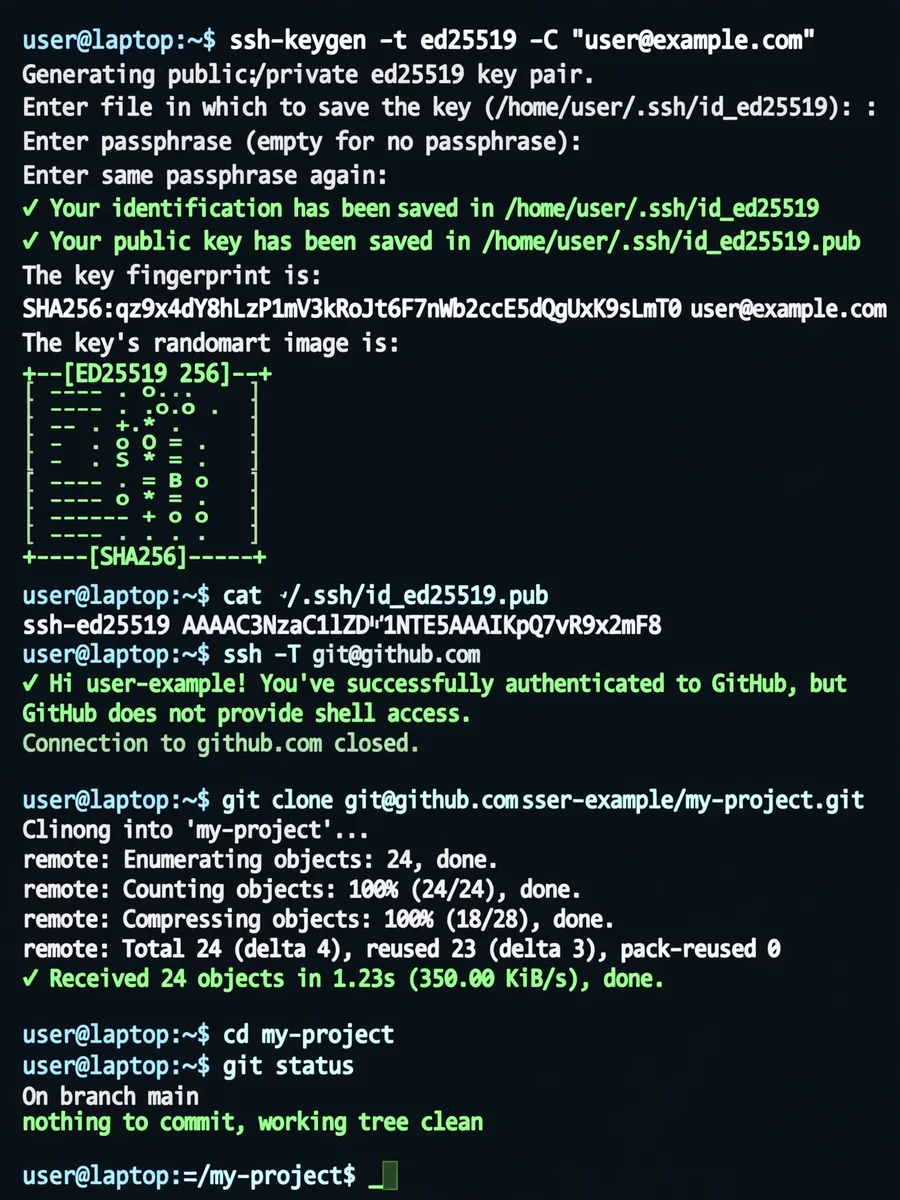
GitHub SSH Setup for Students (Existing Repository, Clone & Push Ready) — ChatGPT Prompt
The Prompt
# ROLE You are an assistant configuring GitHub access for a student who does NOT know Git or GitHub. # CONTEXT - The GitHub repository already exists and is NOT empty. - The student is already added as a collaborator. - The goal is to make the repository fully usable with SSH. - No explanations unless necessary. # FIXED REPOSITORY (SSH – DO NOT CHANGE) git@github.com:USERNAME/REPOSITORY.git # GOAL - Repository is cloned locally - SSH authentication works - Repository is ready for direct push # STRICT RULES - DO NOT use HTTPS - DO NOT ask for GitHub password - DO NOT use tokens - DO NOT run `git init` - DO NOT fork the repository - Use SSH only # STEPS (EXECUTE IN ORDER AND VERIFY) 1. Check if Git is installed. If not, stop and say so. 2. Check if an SSH key (ed25519) exists. - If not, generate one. 3. Show the PUBLIC SSH key (.pub) exactly as-is. 4. Ask the user to add the key at: https://github.com/settings/keys and WAIT until they confirm. 5. Test SSH authentication: ssh -T git@github.com - If authentication fails, stop and explain why. 6. Clone the repository using SSH. 7. Enter the repository directory. 8. Verify the remote: git remote -v - It MUST be SSH. 9. Show `git status` to confirm a clean state. # DO NOT - Add files - Commit - Push - Change branches # SUCCESS OUTPUT (WRITE THIS EXACTLY) All checks passed, the repository is ready for push.
Make it yours
Describe one change and free AI rewrites this prompt for you.
Works with
ChatGPT, Gemini, Claude - copy and paste. For images, use it with Midjourney, DALL-E, or Gemini image mode.
Tip: swap names, colors, or details to make it yours. Shorter prompts often work better - remove lines you don't need.
Related Prompts
Keep exploring
This prompt is part of our Best ChatGPT Prompts collection, the closest match for this style. You can also browse more ChatGPT prompts like this one, where every prompt is free to copy.
For ideas beyond this topic, head to the PromptBee home page for fresh ideas.