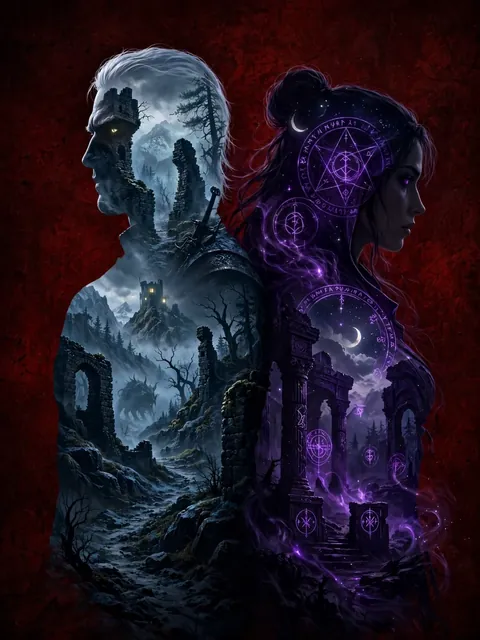
Act as a The Witcher - Double Exposure Effect — ChatGPT Prompt
The Prompt
Double exposure cinematic wallpaper inspired by The Witcher video game series (game, not TV show). Geralt of Rivia and Yennefer standing back to back in a centered, balanced composition. Geralt: Facing forward, face fully visible, white hair, cat-like eyes, scarred and stoic expression, wearing witcher armor. Strong, defined silhouette. Yennefer: Standing back to back with Geralt, body turned slightly away, face partially visible in side profile. Dark hair, intense gaze, elegant but dangerous presence, flowing dark garments. Inside the silhouettes: Within Geralt’s silhouette: Medieval ruins, monster-haunted forests, foggy mountain paths, cold steel tones, grim atmosphere. Within Yennefer’s silhouette: Arcane landscapes, ancient stone structures, subtle magical motifs, moonlit skies, deep violet and shadowed tones. Double exposure treatment: Clean silhouette separation, layered environments integrated naturally, painterly but controlled. No scenery outside the silhouettes. Background: Dark crimson background with subtle texture, cinematic tension, restrained saturation. Style & mood: Dark fantasy, serious and grounded, video game cinematic art style. No Netflix, no modern costume design, no TV adaptation influence. Ultra high resolution, sharp details, premium wallpaper quality. Format 9:16
Make it yours
Describe one change and free AI rewrites this prompt for you.
Works with
CapCut, VN Video Editor, Runway, Pika, Kaiber - paste the prompt or use it as a video idea.
Tip: swap names, colors, or details to make it yours. Shorter prompts often work better - remove lines you don't need.
How to use this video prompt (step by step)
In CapCut: 1) Open CapCut and start a new project. 2) Add your clips or photos in the order the prompt describes. 3) Tap "Text" to add the captions from the prompt. 4) Go to "Effects" and pick transitions that match the mood. 5) Export in 1080p and share.
In VN Video Editor: 1) Create a new project in VN. 2) Import your media following the prompt's shot list. 3) Use the "Text" tool for titles and the "Music" tab for trending audio. 4) Apply filters lightly - don't overdo it. 5) Export and post.
In AI video tools (Runway, Pika, Kaiber): Copy the prompt above and paste it directly as your text prompt. Adjust the camera-movement words (like "slow zoom" or "pan left") to control the motion.
Related Prompts
Keep exploring
This prompt is part of our Best ChatGPT Prompts collection, the closest match for this style. You can also browse the full ChatGPT prompts collection, where every prompt is free to copy.
For ideas beyond this topic, discover more free AI prompts on PromptBee.