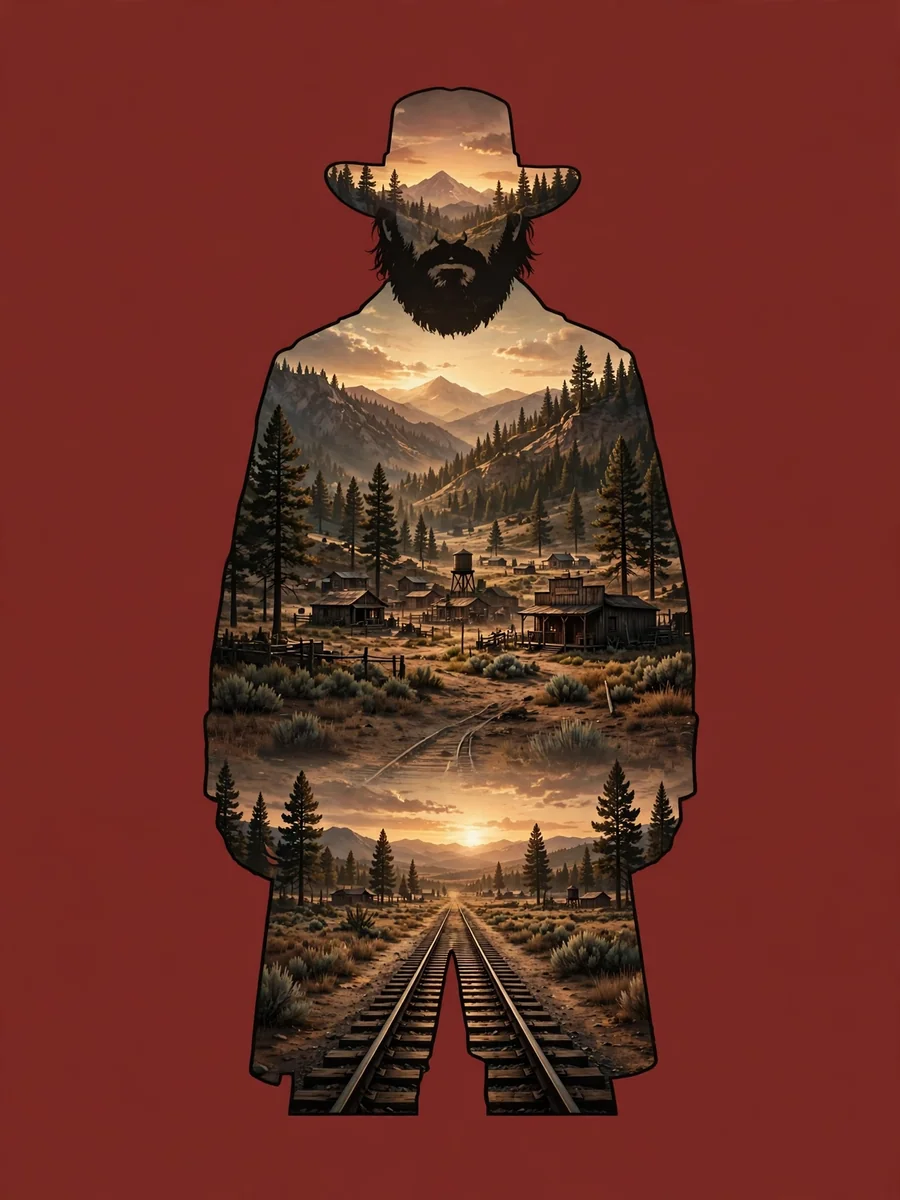
Red Dead Redemption 2 - Double Exposure Effect — ChatGPT Prompt
The Prompt
Double exposure cinematic wallpaper inspired by the video game Red Dead Redemption 2 (game, not TV series). Arthur Morgan standing alone, centered, iconic pose, facing forward. Rugged, weathered face, thick beard, intense and weary expression, classic outlaw attire with hat and long coat. Strong silhouette with clean edges. Inside Arthur Morgan’s silhouette: The American frontier from Red Dead Redemption 2 dusty plains, pine forests, wooden towns, distant mountains, train tracks fading into the horizon. Subtle sunset light, warm earthy tones, melancholy atmosphere, sense of fading era. Double exposure treatment: Smooth, refined blending inside the silhouette, no chaotic overlays, landscape flowing naturally through the figure. No scenery outside the silhouette. Background: Deep muted red background, dramatic but restrained, cinematic contrast, no gradients or neon glow. Style & mood: Serious, grounded, cinematic realism, emotional weight, video game concept art style. No modern elements, no fantasy, no TV adaptation influence. Ultra high resolution, sharp details, premium wallpaper quality. Format 9:16
Make it yours
Describe one change and free AI rewrites this prompt for you.
Works with
CapCut, VN Video Editor, Runway, Pika, Kaiber - paste the prompt or use it as a video idea.
Tip: swap names, colors, or details to make it yours. Shorter prompts often work better - remove lines you don't need.
How to use this video prompt (step by step)
In CapCut: 1) Open CapCut and start a new project. 2) Add your clips or photos in the order the prompt describes. 3) Tap "Text" to add the captions from the prompt. 4) Go to "Effects" and pick transitions that match the mood. 5) Export in 1080p and share.
In VN Video Editor: 1) Create a new project in VN. 2) Import your media following the prompt's shot list. 3) Use the "Text" tool for titles and the "Music" tab for trending audio. 4) Apply filters lightly - don't overdo it. 5) Export and post.
In AI video tools (Runway, Pika, Kaiber): Copy the prompt above and paste it directly as your text prompt. Adjust the camera-movement words (like "slow zoom" or "pan left") to control the motion.
Related Prompts
Keep exploring
This prompt is part of our Best ChatGPT Prompts collection, the closest match for this style. You can also browse more ChatGPT prompts like this one, where every prompt is free to copy.
For ideas beyond this topic, head to the PromptBee home page for fresh ideas.