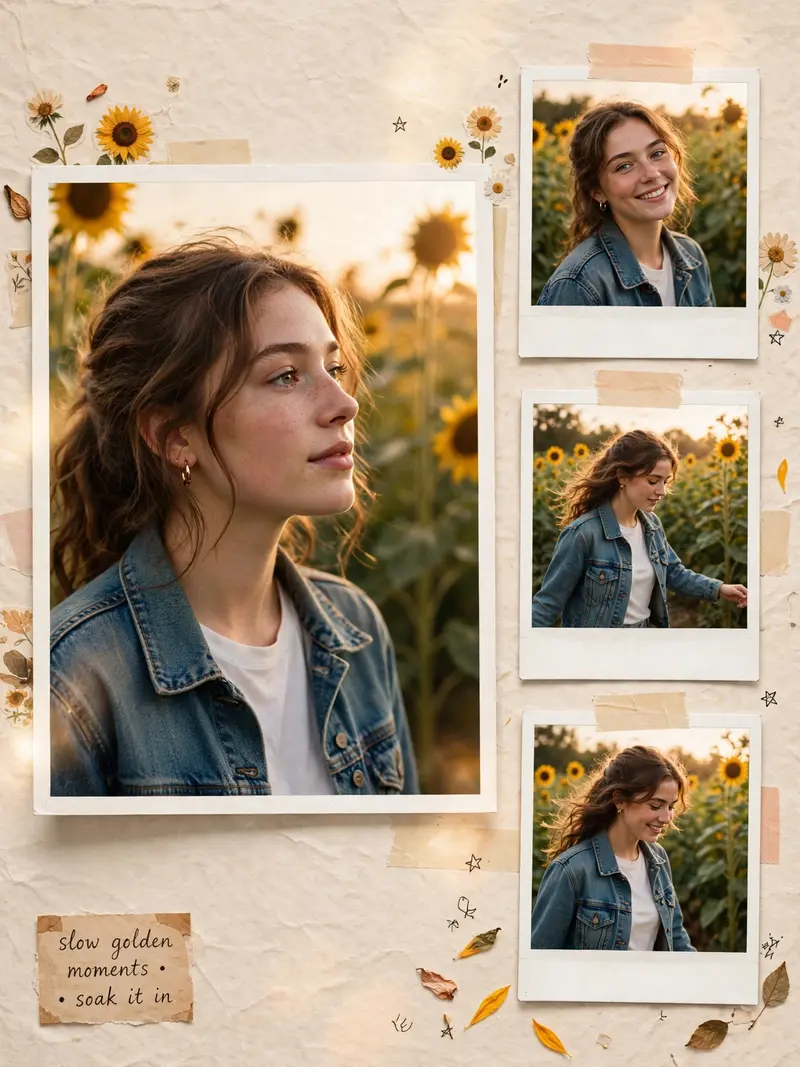
Sunflower Girl Instagram Collage
The Prompt
Use the uploaded image as the ONLY facial identity reference. STRICT IDENTITY RULE: – Face must remain 100% identical to the uploaded image – No beautification, no reshaping, no skin smoothing – Preserve real skin texture, expressions, proportions – Do NOT change hairstyle, age, or facial structure STYLE & AESTHETIC: – Create a trendy Instagram collage edit with a warm golden sunlight vibe – Outdoor garden / sunflower theme – Soft cinematic golden hour lighting – Natural shadows, slightly lifted exposure – Add aesthetic scrapbook elements: sunflowers, paper textures, stickers, soft overlays – Clean, premium, Instagram-ready layout MAIN + SIDE FRAMES (IMPORTANT): – One main large portrait (center or slightly off-center) – Add exactly 3 small polaroid-style images on the side (vertical strip) POSE VARIATION (STRICT RULE): – Each of the 3 small images MUST have different poses – Pose 1: Looking away / side profile – Pose 2: Smiling / slight tilt / candid – Pose 3: Walking / hand movement / natural motion – Do NOT repeat the same pose – Keep the same outfit and same location for all frames – Face identity must remain EXACTLY the same in all poses EXTRA: – Optional small aesthetic quote sticker (subtle, not distracting) QUALITY: – Ultra-realistic, high detail, iPhone-like natural color science, sharp subject focus, 4K output, no over-editing, no artificial skin Note: This prompt tends to perform best in ChatGPT.
Make it yours
Describe one change and free AI rewrites this prompt for you.
Works with
ChatGPT, Gemini, Claude - copy and paste. For images, use it with Midjourney, DALL-E, or Gemini image mode.
Tip: swap names, colors, or details to make it yours. Shorter prompts often work better - remove lines you don't need.