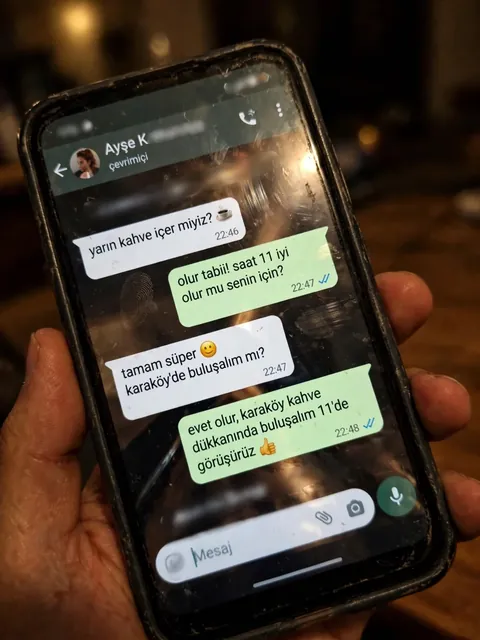
Realistic Amateur Phone Photo with WhatsApp Chat — ChatGPT Prompt
The Prompt
Create a realistic, poorly taken amateur photo of a physical smartphone showing a WhatsApp chat on its screen. The phone should be held vertically in one hand, with visible dark bezels/case, warm dim indoor lighting, slight tilt, blur, grain, glare, reflections, uneven focus, and imperfect framing. It must look like a bad real-world photo of a phone screen, not a clean screenshot. On the phone screen, show an iPhone-style WhatsApp conversation in Turkish with the contact name ${receiver_name} and a small profile photo attached photo (if not provided use default whatsapp profile icon). Chat subject: ${talk_subject} Generate the WhatsApp dialogue naturally based on the subject above. The contact’s messages should be in ${language_name:Turkish} language and ${talk_style} (e.g. broken ${language_name:Turkish} with typos and awkward wording. My messages should be correct ${language_name:Turkish} with no typos). Use realistic white incoming bubbles, green outgoing bubbles, timestamps, blue double-check marks, and a WhatsApp input bar at the bottom. Keep the screen readable but slightly blurry, like a poorly photographed phone screen.
Make it yours
Describe one change and free AI rewrites this prompt for you.
Works with
ChatGPT, Gemini, Claude - copy and paste. For images, use it with Midjourney, DALL-E, or Gemini image mode.
Tip: swap names, colors, or details to make it yours. Shorter prompts often work better - remove lines you don't need.
Related Prompts

Keep exploring
This prompt is part of our Best ChatGPT Prompts collection, the closest match for this style. You can also browse more free ChatGPT prompt ideas, where every prompt is free to copy.
For ideas beyond this topic, check the latest additions on the PromptBee homepage.