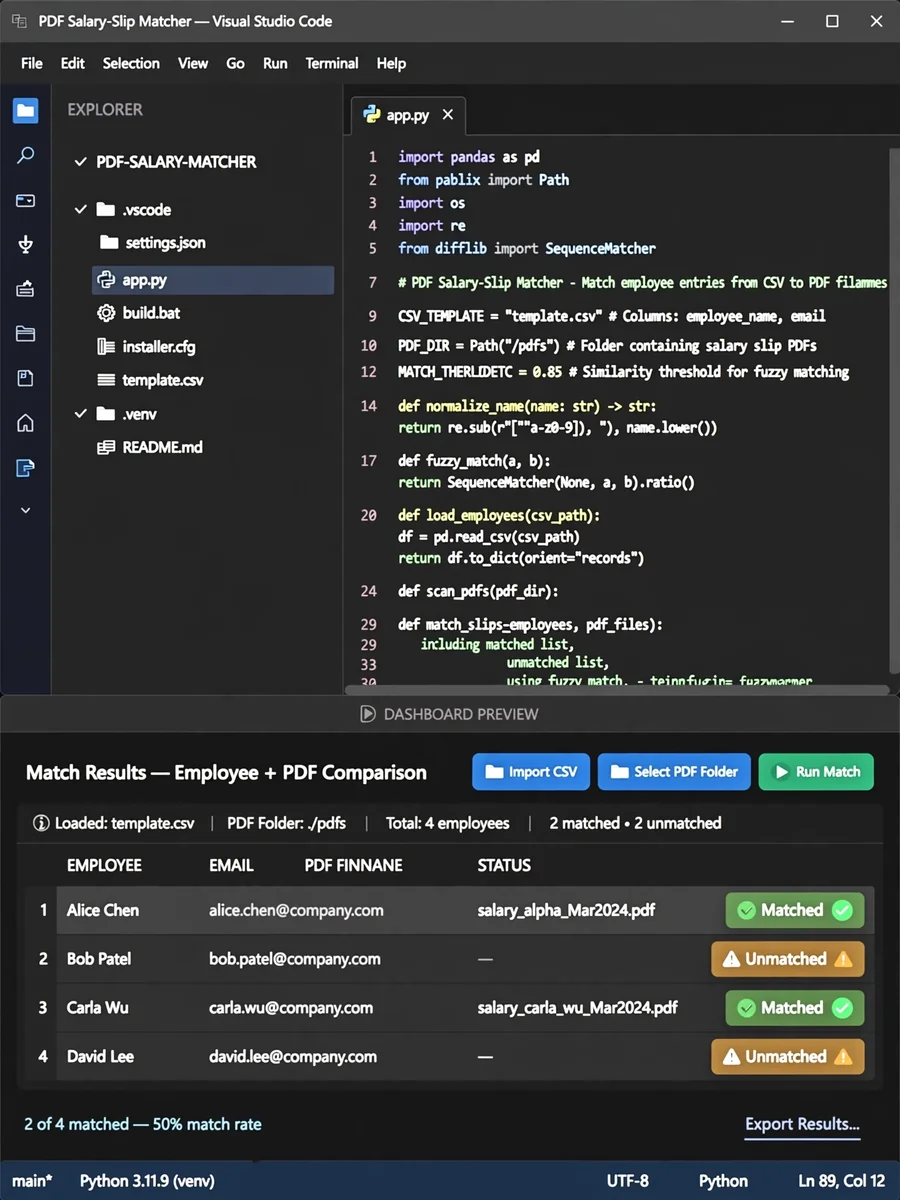
Python App Source with PyInstaller Build and Installer — ChatGPT Prompt
The Prompt
complete source code for the application + `build.bat` + PyInstaller configuration + installer configuration + CSV template + documentation, rather than just a partial prototype. i will upload csv and bulk pdf file. after clickig button match name and pdf file process file will be send to provided email id which in csv note: This error originates from a subprocess, and is likely not a problem with pip. ERROR: Failed building wheel for Levenshtein Failed to build Levenshtein error: failed-wheel-build-for-install × Failed to build installable wheels for some pyproject.toml based projects ╰─> Levenshtein ERROR: Failed to install required packages cpanel webmail Set up email on application tool PDF Auto MATCHING LOGIC: EmployeeID, FirstName, MiddleName, LastName NAME-BASED MATCHING If Employee ID is not found in the filename, implement a controlled secondary matching method based on employee name. Example: PDF: ``` Abel Harry Anthony.pdf ``` CSV: ``` 10152 | Abel | Harry | Anthony | abel@example.com ``` The application should identify: ``` Abel Harry Anthony ``` and match it with the CSV record. The matching logic can be changed so the application uses any 3 of the 4 CSV fields: * `ID` * `First Name` * `Middle Name` * `Last Name` Input PDF: 10004_Vihang_Wani_SalarySlip_March_2026.pdf no need to rename the pdf file once it's attached also show dashboard me all attachments before sending email can be built as a Windows desktop application that: 1. Imports an employee CSV. 2. Lets you select a folder containing hundreds/thousands of PDFs. 3. Extracts the Employee ID from each filename. 4. Finds the matching employee in the CSV. 5. Renames the PDF according to a defined format. 6. Shows success, unmatched, duplicate, and error reports. 7. Provides a one-click Windows build that produces a `.exe`. For your example:Input: SumitShyamraoTunkikar_0020063_Aug_2026.pdf CSV: 20063 | Sumit | Shyamrao | Tunkikar Output: 20063_Sumit_Shyamrao_Tunkikar.pdf Or Input: Abel Harry Anthony.pdf CSV: 10152 | Abel | Harry | Anthony Output:10152_Abel_Harry_Anthony.pdf Or Input: AbhishekYadav_0020311_Aug_2026.pdf CSV: 20311 | Abhishek | Yadav Output:20311_Abhishek_Yadav.pdf SAFETY Original PDFs are preserved by default. The output is written to a separate folder. Add Naming Templates: Configure rename patterns: add Placeholders: ${employeeid} ${firstname} ${middlename} ${surname} ${month} ${year} Define how renamed pdf should look example: Pattern ${employeeid}${firstname}${surname}SalarySlip${month}${year} Or ${employeeid}${firstname}${middlename}${surname}SalarySlip${month}_${year} Live preview 20311_Abhishek_Yadav_SalarySlip_August_2026.pdf the specification to: The matching logic can be changed so the application uses any 3 of the 4 CSV fields: * `ID + First Name + Middle Name + Surname` * `ID + First Name + Surname` * `First Name + Middle Name + Surname` when no ID is present * Handle concatenated names such as `SumitShyamraoTunkikar` * Handle spaced names such as `Abel Harry Anthony` * Normalize leading-zero IDs: `0020063` → `20063` * Preserve the original PDFs * Never overwrite an existing output PDF * Separate Input and Output folders * Add configurable naming templates: * `${employeeid}` * `${firstname}` * `${middlename}` * `${surname}` * `${month} I will select month` * `${year} I will select year` * Extract `Month` and `Year` from the original filename where available * Provide a live preview * Provide a Preview/Review table before processing * Export unmatched/duplicate/error reports * Include Undo for the current output run Match method: uses any 3 of the 4 CSV must
Make it yours
Describe one change and free AI rewrites this prompt for you.
Works with
ChatGPT, Gemini, Claude - copy and paste. For images, use it with Midjourney, DALL-E, or Gemini image mode.
Tip: swap names, colors, or details to make it yours. Shorter prompts often work better - remove lines you don't need.
Related Prompts

Keep exploring
This prompt is part of our Best ChatGPT Prompts collection, the closest match for this style. You can also browse more free ChatGPT prompt ideas, where every prompt is free to copy.
For ideas beyond this topic, discover more free AI prompts on PromptBee.