Patriotic Bike Ride Video
The Prompt
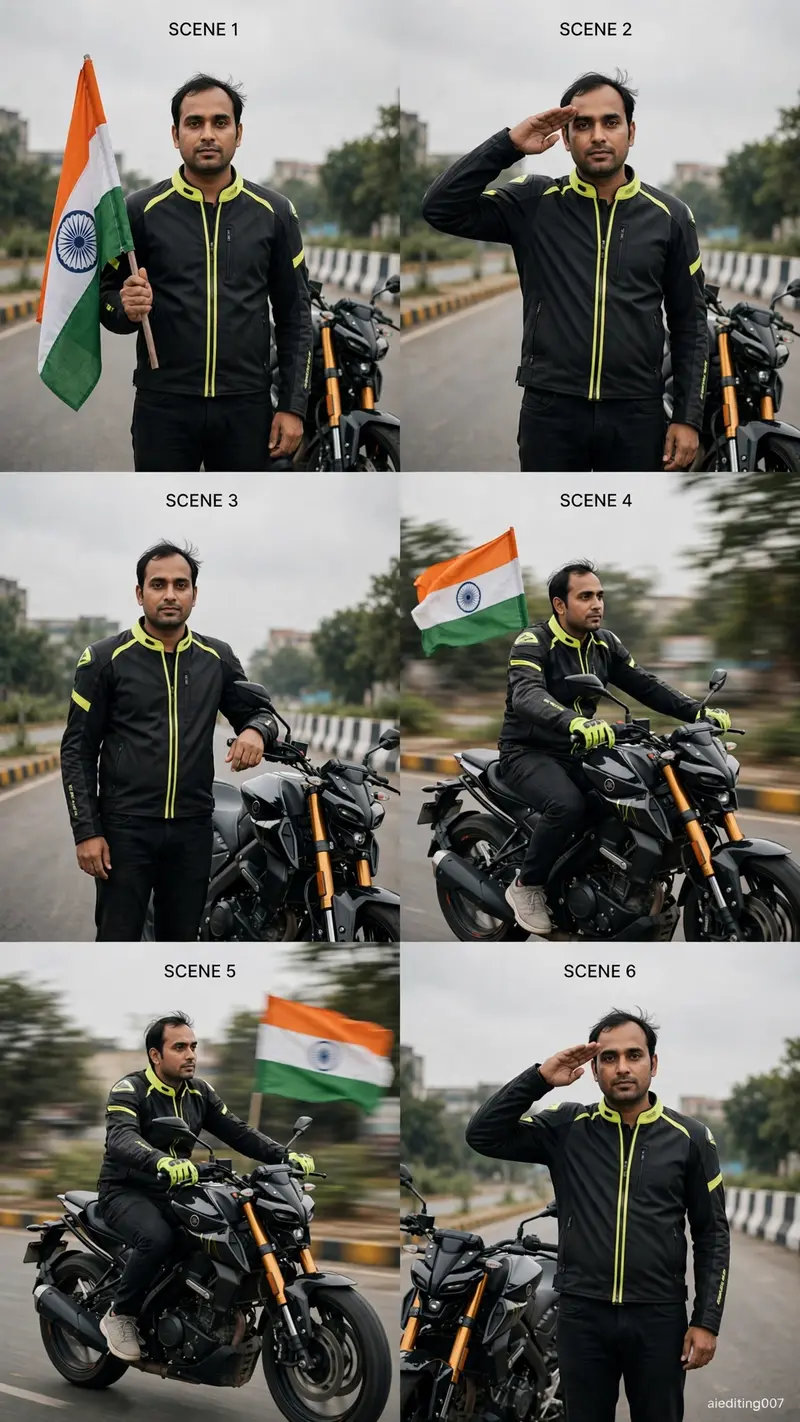
Use the uploaded photo as the ONLY identity reference. IDENTITY PRESERVATION IS THE HIGHEST PRIORITY. Create one ultra-realistic vertical 9:16 cinematic 10-second patriotic motorcycle video. The subject must remain the EXACT SAME real person from the uploaded photo in every frame. Preserve the exact face shape, eyes, eyebrows, nose, lips, jawline, ears, skin tone, hairstyle, hairline, natural age, height, shoulder width, body shape, arm length and leg length. DO NOT regenerate the face after scene cuts. DO NOT create a similar-looking person. Use one permanently locked facial identity and one permanently locked body throughout the entire video. Keep natural facial asymmetry, skin texture and hairstyle exactly as in the uploaded photo. No beautification, smoothing, age change, body slimming or muscle enlargement. NO helmet, NO visor, NO mask. The real face and hairstyle must remain visible. Keep one identical outfit throughout: black premium riding jacket with neon-yellow details, black trousers, neon-yellow gloves and light sneakers. Keep one identical black naked street motorcycle with orange-gold front forks. Keep the same empty urban road, yellow-black divider, black-white barriers, green trees and soft grey overcast sky throughout. Keep one correct Indian national flag with saffron, white, green and navy-blue Ashoka Chakra. SCENE 1: Front three-quarter full-body shot. The person stands holding the Indian flag. Keep the face large, sharp and identical to the uploaded photo. Very slow camera push-in. SCENE 2: Same face angle. The person gives a respectful salute. Only the arm moves; keep the head almost completely still. SCENE 3: The person stands beside the motorcycle with one hand near the handlebar. Face remains front three-quarter and clearly visible. SCENE 4: Slow motorcycle riding shot. Use a gentle side-front tracking camera. Keep the head stable and face clearly visible. Indian flag waves behind. SCENE 5: Continue the slow ride. No salute while moving. Keep both hands naturally controlling the motorcycle to prevent body and face distortion. Maintain the exact same face. SCENE 6: The motorcycle stops. Final medium hero shot beside the bike. The person looks directly toward the camera and gives a respectful salute. Hold this final face clearly for at least one second. Use low subject motion, smooth camera movement, realistic flag physics and premium muted cinematic colour grading. FACE SAFETY RULES: No fast head turns. No extreme side profile. No rear-to-front facial transformation. No camera orbit. No face motion blur. No fast zoom. No facial expression changes that reshape the face. No face enhancement. Keep “aiediting007” fixed in the lower-right corner throughout the video in small premium white text. NEGATIVE: no face change, no identity drift, no face morphing, no face swap, no reconstructed face, no different eyes, no different nose, no different lips, no different jawline, no hairstyle change, no age change, no height change, no body change, no outfit change, no bike change, no helmet, no extra people, no duplicate person, no broken hands, no cartoon, no CGI skin.
Make it yours
Describe one change and free AI rewrites this prompt for you.
Works with
CapCut, VN Video Editor, Runway, Pika, Kaiber - paste the prompt or use it as a video idea.
Tip: swap names, colors, or details to make it yours. Shorter prompts often work better - remove lines you don't need.
How to use this video prompt (step by step)
In CapCut: 1) Open CapCut and start a new project. 2) Add your clips or photos in the order the prompt describes. 3) Tap "Text" to add the captions from the prompt. 4) Go to "Effects" and pick transitions that match the mood. 5) Export in 1080p and share.
In VN Video Editor: 1) Create a new project in VN. 2) Import your media following the prompt's shot list. 3) Use the "Text" tool for titles and the "Music" tab for trending audio. 4) Apply filters lightly - don't overdo it. 5) Export and post.
In AI video tools (Runway, Pika, Kaiber): Copy the prompt above and paste it directly as your text prompt. Adjust the camera-movement words (like "slow zoom" or "pan left") to control the motion.