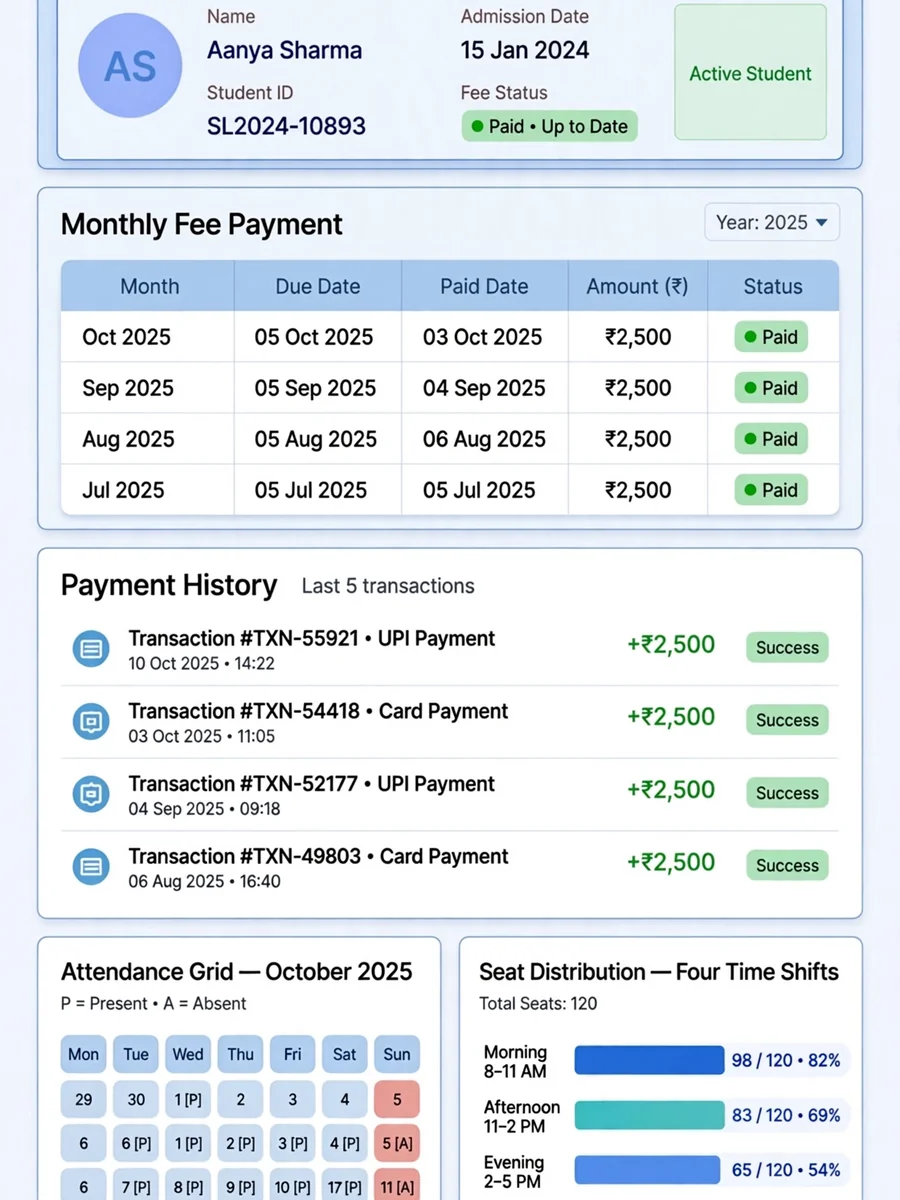
Online Library Admission and Fee Rules Manager — ChatGPT Prompt
The Prompt
In my library there are 4 or section 1-new admission after completion of 1 month the student can renew there session, addmission could be done without initial fee payment but if the fee not paid within 10 days of admission the addmission can be cancelled or in red zone, after completion of 1 month the renew fee will also be paid within the 2nd months starting 10 days otherwise renewal will be cancelled, 2-In fee section a table will be displayed where monthly fee date wise stored and a function of payment history will also be added when the student record open then name address mobile admission date fee payment date and payment history list of past 5 months will be shown, 3-In attendance section one simple table is displayed where I can present or absent the student and also show the current day all present student and a each student how many days attend the library, 4-In sheet distribution section some selected no of sheets display one sheet for one student and the sheets are assigned shift wise there are 4 shift available 7am-1pm, 1pm-7pm,10am-3pm,10am-7pm
Make it yours
Describe one change and free AI rewrites this prompt for you.
Works with
ChatGPT, Gemini, Claude - copy and paste. For images, use it with Midjourney, DALL-E, or Gemini image mode.
Tip: swap names, colors, or details to make it yours. Shorter prompts often work better - remove lines you don't need.
Related Prompts




Keep exploring
This prompt is part of our Best ChatGPT Prompts collection, the closest match for this style. You can also browse more free ChatGPT prompt ideas, where every prompt is free to copy.
For ideas beyond this topic, check the latest additions on the PromptBee homepage.