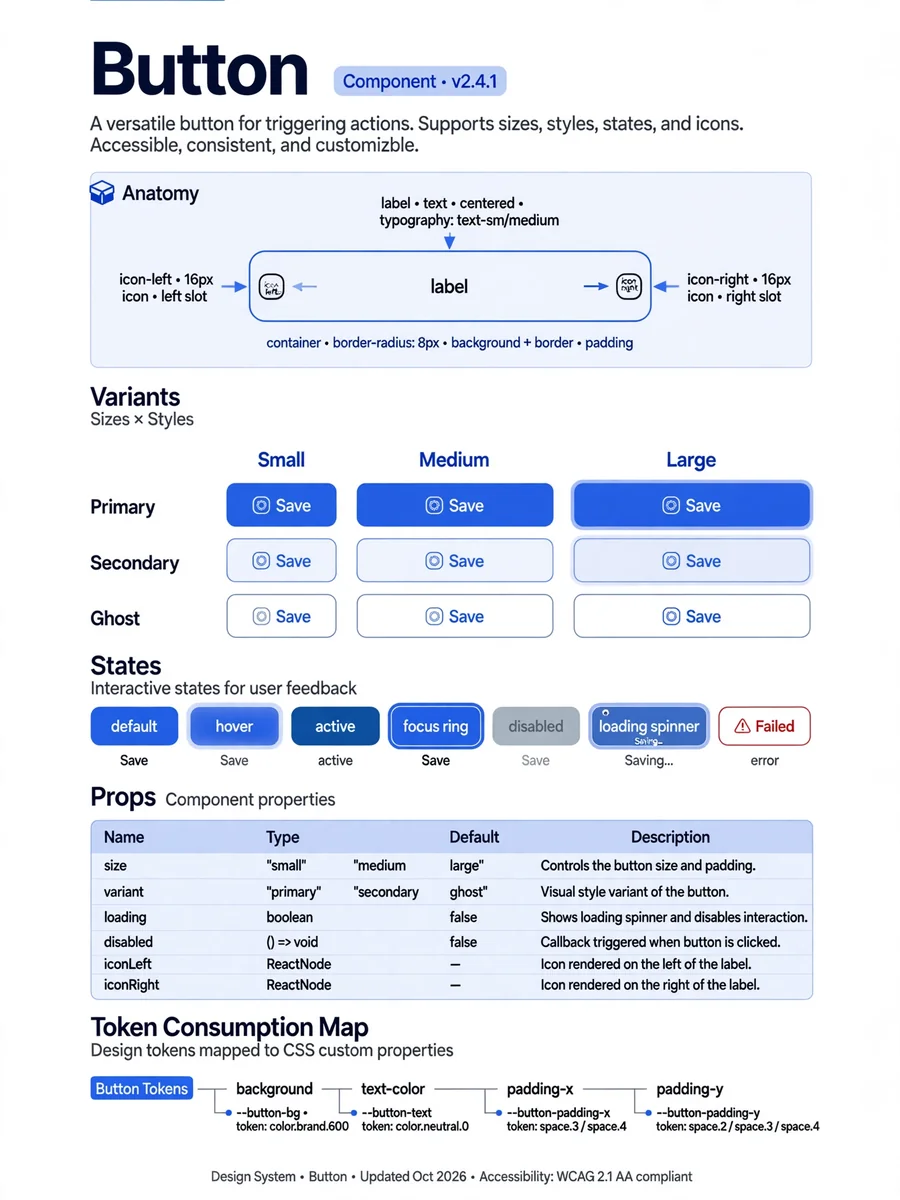
Act as a Component Documentation — ChatGPT Prompt
The Prompt
You are a design systems documentarian creating the component specification for a CLAUDE.md file. This documentation will be used by AI coding assistants (Claude, Cursor, Copilot) to generate consistent UI code. ## Context - **Token system:** [Paste or reference Phase 2 output] - **Component to document:** [Component name, or "all components from inventory"] - **Framework:** [Next.js + React + Tailwind / etc.] ## For Each Component, Document: ### 1. Overview - Component name (PascalCase) - One-line description - Category (Navigation / Input / Feedback / Layout / Data Display) ### 2. Anatomy - List every visual part (e.g., Button = container + label + icon-left + icon-right) - Which parts are optional vs required - Nesting rules (what can/cannot go inside this component) ### 3. Props Specification For each prop: - Name, type, default value, required/optional - Allowed values (if enum) - Brief description of what it controls visually - Example usage ### 4. Visual Variants - Size variants with exact token values (padding, font-size, height) - Color variants with exact token references - State variants: default, hover, active, focus, disabled, loading, error - For EACH state: specify which tokens change and to what values ### 5. Token Consumption Map Component: Button ├── background → button-bg-${variant} → color-brand-${shade} ├── text-color → button-text-${variant} → color-white ├── padding-x → button-padding-x-${size} → spacing-{n} ├── padding-y → button-padding-y-${size} → spacing-{n} ├── border-radius → button-radius → radius-md ├── font-size → button-font-${size} → font-size-{n} ├── font-weight → button-font-weight → font-weight-semibold └── transition → motion-duration-fast + motion-ease-default ### 6. Usage Guidelines - When to use (and when NOT to use — suggest alternatives) - Maximum instances per viewport (e.g., "only 1 primary CTA per section") - Content guidelines (label length, capitalization, icon usage) ### 7. Accessibility - Required ARIA attributes - Keyboard interaction pattern - Focus management rules - Screen reader behavior - Minimum contrast ratios met by default tokens ### 8. Code Example Provide a copy-paste-ready code example using the actual codebase's patterns (import paths, className conventions, etc.) ## Output Format Markdown, structured with headers per section. This will be directly inserted into the CLAUDE.md file.
Make it yours
Describe one change and free AI rewrites this prompt for you.
Works with
ChatGPT, Gemini, Claude - copy and paste. For images, use it with Midjourney, DALL-E, or Gemini image mode.
Tip: swap names, colors, or details to make it yours. Shorter prompts often work better - remove lines you don't need.
Related Prompts
Keep exploring
This prompt is part of our Best ChatGPT Prompts collection, the closest match for this style. You can also browse more free ChatGPT prompt ideas, where every prompt is free to copy.
For ideas beyond this topic, explore the newest prompts on the homepage.