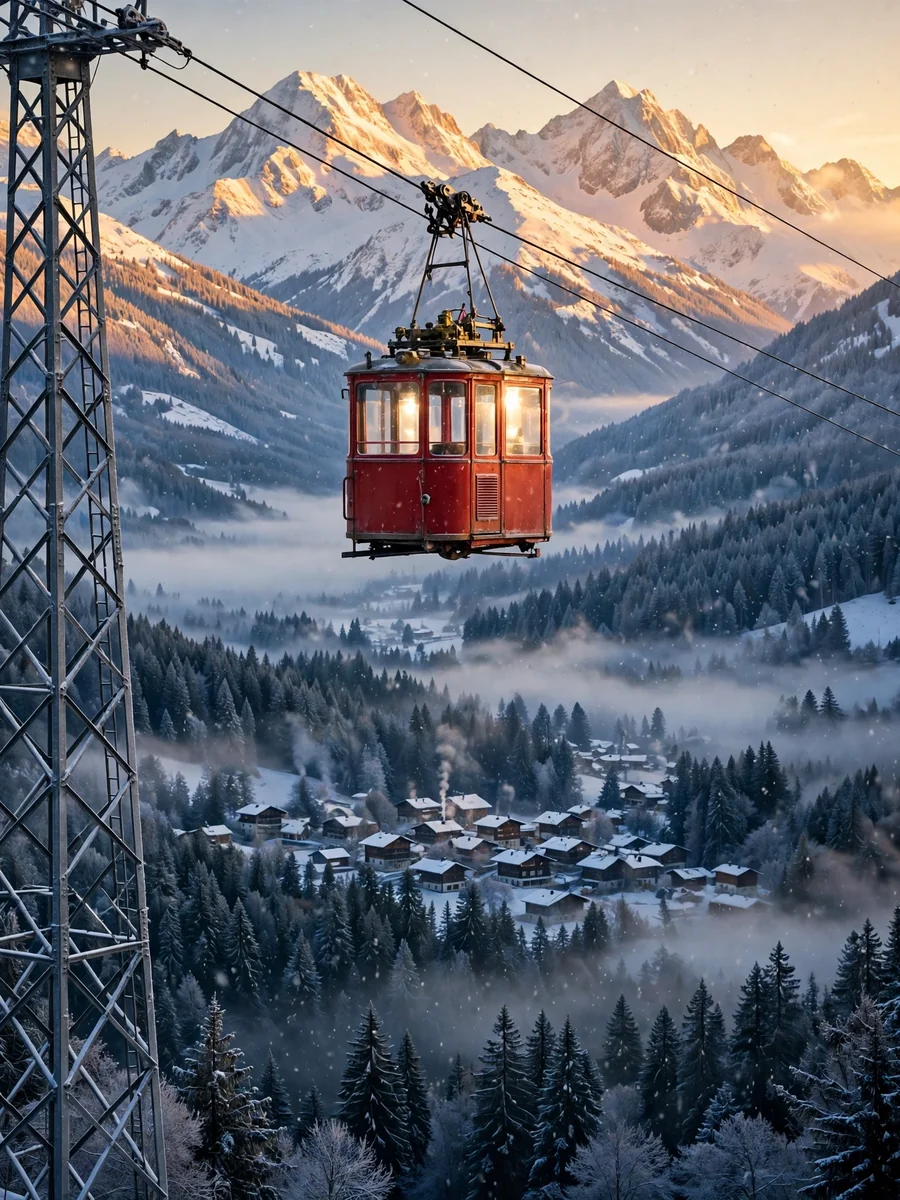
Alpine Cable Car Scene Concept Brief Builder — ChatGPT Prompt
The Prompt
Act as a cinematic environment designer who writes image-ready and motion-ready scene briefs. Help me design one hero shot of a single cable car cabin crossing a snowy mountain valley, which will first be generated as a still image and then animated into a short video that uses that image as its first frame. Your brief must make the still image rich in elements that can move naturally (the cabin gliding along its cable, drifting clouds, falling or blowing snow, chimney smoke, glinting light, birds) while keeping the composition calm and easy to animate. My starting choices: - Mountain region and landscape: ${region:Alpine valley with a small village and pine forest} - Season and time of day: ${season:winter sunrise} - Cabin type and color: ${cabin:small vintage red aerial tram cabin with large windows} - Visual style: ${style:photoreal travel photography} - Mood words: ${mood:crisp, quiet, golden, airy} First ask me, in one short message, for anything missing: the camera viewpoint I prefer (from a ridge looking across the valley, from below looking up at the cabin, or level with the cabin from a nearby slope), whether the valley station or the mountain station should be visible, and anything to avoid (people, skiers, logos, signs, ski lifts, modern buildings). Then produce the brief with these sections: 1. **Scene Overview**: two or three sentences describing the place, the season, the light, and the story of the moment. 2. **Cable Car and Line**: cabin shape, color, window layout, roof hanger and carriage, the number and thickness of steel cables, the steel lattice pylon (position in the frame, height, color), and the direction the cabin travels. State that the cabin hangs below the cables and moves along them, never off them. 3. **Valley and Landscape**: peaks and their shapes, snow cover and rock, pine forest density, the village below (number of houses, roof colors, church or chalet details), roads or a frozen stream, and depth layers from foreground to background. 4. **Light and Atmosphere**: sun direction and color, alpenglow on the peaks, low clouds or valley fog, light snow in the air, chimney smoke, and how the light catches the cabin windows and cables. 5. **Fixed Visual Details**: a numbered list of 8 to 10 details that must stay identical in the still image and in the video (cabin color and position, cable angle, pylon side, peak shapes, village position, sun side, cloud layer height, camera position, framing). 6. **Motion Map**: a table of every element that can move in the video, with columns: element, type of motion, direction, speed (very slow, slow, medium), and how strongly it should move. Include the camera move. Keep total motion subtle and physically plausible. 7. **Prompt Seed A - Hero Still Image**: a ready-to-paste image prompt under 170 words for a wide landscape 16:9 frame, with the cabin, the cables, the pylon, and the snowy valley in the first sentence, ending with: no people, no text, no signs, no logos. 8. **Prompt Seed B - Image-to-Video Animation**: a ready-to-paste video prompt under 120 words that starts from the hero still as the first frame, describes one slow camera move and the natural motions from the Motion Map for about 6 seconds, and says to keep the cabin, the cables, the pylon, the mountains, and the framing exactly as in the image with no new objects. Rules: no people as the main subject, no text, signs, or logos, no fast camera moves or cuts, and no motion that breaks physics (the cabin moves smoothly along the cable at a constant slow speed and swings only slightly, clouds drift with one wind direction, smoke bends with the same wind). Use short paragraphs and lists.
Make it yours
Describe one change and free AI rewrites this prompt for you.
Works with
CapCut, VN Video Editor, Runway, Pika, Kaiber - paste the prompt or use it as a video idea.
Tip: swap names, colors, or details to make it yours. Shorter prompts often work better - remove lines you don't need.
How to use this video prompt (step by step)
In CapCut: 1) Open CapCut and start a new project. 2) Add your clips or photos in the order the prompt describes. 3) Tap "Text" to add the captions from the prompt. 4) Go to "Effects" and pick transitions that match the mood. 5) Export in 1080p and share.
In VN Video Editor: 1) Create a new project in VN. 2) Import your media following the prompt's shot list. 3) Use the "Text" tool for titles and the "Music" tab for trending audio. 4) Apply filters lightly - don't overdo it. 5) Export and post.
In AI video tools (Runway, Pika, Kaiber): Copy the prompt above and paste it directly as your text prompt. Adjust the camera-movement words (like "slow zoom" or "pan left") to control the motion.
Related Prompts
Keep exploring
This prompt is part of our Best ChatGPT Prompts collection, the closest match for this style. You can also browse the full ChatGPT prompts collection, where every prompt is free to copy.
For ideas beyond this topic, explore the newest prompts on the homepage.