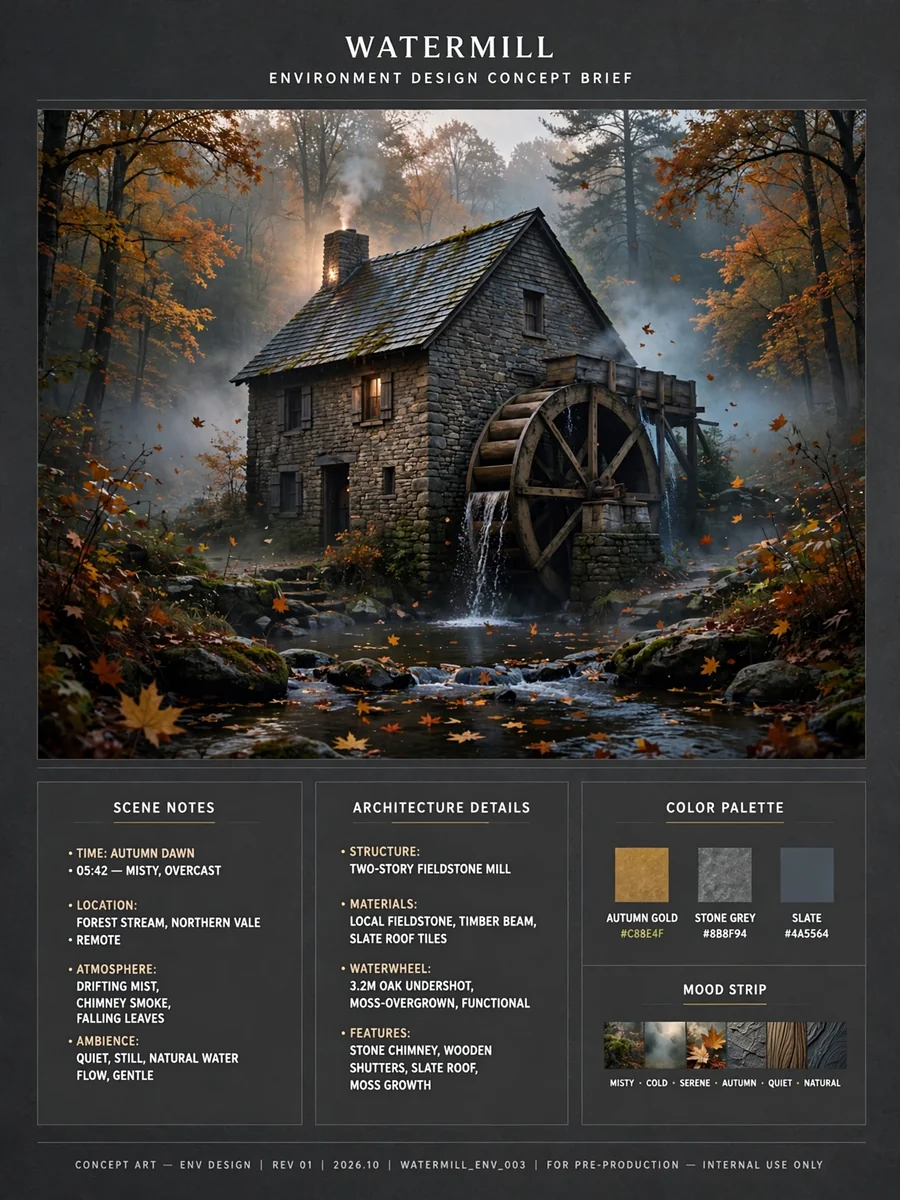
Act as a Stone Watermill Scene Concept Brief Builder — ChatGPT Prompt
The Prompt
Act as a cinematic environment designer who writes image-ready and motion-ready scene briefs. Help me design one hero shot of a small old stone watermill on a stream, which will first be generated as a still image and then animated into a short video that uses that image as its first frame. Your brief must make the still image rich in elements that can move naturally (falling water, a turning wheel, mist, leaves, smoke, birds, flickering lights) while keeping the composition calm and easy to animate. My starting choices: - Region and landscape: ${region:temperate forest valley} - Season and time of day: ${season:autumn dawn} - Mill size and age: ${mill:two-story fieldstone mill, about 200 years old} - Visual style: ${style:photoreal landscape photography} - Mood words: ${mood:quiet, golden, misty, timeless} First ask me, in one short message, for anything missing: the camera viewpoint I prefer (across the stream, from a small footbridge, or low near the water), whether the mill is still working or restored as a home or museum, and anything to avoid (people, animals, modern cars, power lines, signs). Then produce the brief with these sections: 1. **Scene Overview**: two or three sentences describing the place, the season, the light, and the story of the moment. 2. **Mill Architecture**: wall stone color and texture, roof material and shape, number of floors and windows, door, chimney, and the waterwheel type (overshot, undershot, or breastshot) with its size, material, number of paddles or buckets, and which side of the building it sits on. Include the wooden chute or millrace that feeds it. 3. **Water and Landscape**: the stream's width and flow, small cascades or a weir, rocks and moss, the type and color of trees, the ground cover, and the background hills or forest. 4. **Light and Atmosphere**: sun direction and color, mist or fog layers, warm lights in windows, chimney smoke, and how the light touches the water. 5. **Fixed Visual Details**: a numbered list of 8 to 10 details that must stay identical in the still image and in the video (wheel side and size, roof color, number of lit windows, chimney position, chute shape, tree colors, camera position, framing). 6. **Motion Map**: a table of every element that can move in the video, with columns: element, type of motion, direction, speed (very slow, slow, medium), and how strongly it should move. Include the camera move. Keep total motion subtle and physically plausible. 7. **Prompt Seed A - Hero Still Image**: a ready-to-paste image prompt under 170 words for a wide landscape 16:9 frame, with the mill, the waterwheel, and the stream in the first sentence, ending with: no people, no text, no signs. 8. **Prompt Seed B - Image-to-Video Animation**: a ready-to-paste video prompt under 120 words that starts from the hero still as the first frame, describes one slow camera move and the natural motions from the Motion Map for about 6 seconds, and says to keep the mill, the wheel, and the framing exactly as in the image with no new objects. Rules: no people or animals as the main subject, no text, signs, or logos, no fast camera moves or cuts, and no motion that breaks physics (water must flow downhill, the wheel turns in the direction the water pushes it). Use short paragraphs and lists.
Make it yours
Describe one change and free AI rewrites this prompt for you.
Works with
CapCut, VN Video Editor, Runway, Pika, Kaiber - paste the prompt or use it as a video idea.
Tip: swap names, colors, or details to make it yours. Shorter prompts often work better - remove lines you don't need.
How to use this video prompt (step by step)
In CapCut: 1) Open CapCut and start a new project. 2) Add your clips or photos in the order the prompt describes. 3) Tap "Text" to add the captions from the prompt. 4) Go to "Effects" and pick transitions that match the mood. 5) Export in 1080p and share.
In VN Video Editor: 1) Create a new project in VN. 2) Import your media following the prompt's shot list. 3) Use the "Text" tool for titles and the "Music" tab for trending audio. 4) Apply filters lightly - don't overdo it. 5) Export and post.
In AI video tools (Runway, Pika, Kaiber): Copy the prompt above and paste it directly as your text prompt. Adjust the camera-movement words (like "slow zoom" or "pan left") to control the motion.
Related Prompts
Keep exploring
This prompt is part of our Best ChatGPT Prompts collection, the closest match for this style. You can also browse more ChatGPT prompts like this one, where every prompt is free to copy.
For ideas beyond this topic, check the latest additions on the PromptBee homepage.