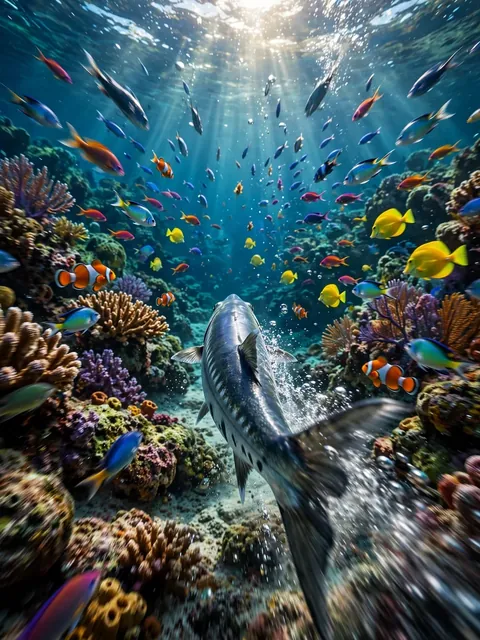
Act as an Underwater Veo 3 video — ChatGPT Prompt
The Prompt
Ultra-realistic 6-second cinematic underwater video: A sleek predator fish darts through a vibrant coral reef, scattering a school of colorful tropical fish. The camera follows from a low FPV angle just behind the predator, weaving smoothly between corals and rocks with dynamic, fast-paced motion. The camera occasionally tilts and rolls slightly, emphasizing speed and depth, while sunlight filters through the water, creating shimmering rays and sparkling reflections. Tiny bubbles and particles float in the water for immersive realism. Ultra-realistic textures, cinematic lighting, dramatic depth of field. Audio: bubbling water, swishing fins, subtle underwater ambience.
Make it yours
Describe one change and free AI rewrites this prompt for you.
Works with
CapCut, VN Video Editor, Runway, Pika, Kaiber - paste the prompt or use it as a video idea.
Tip: swap names, colors, or details to make it yours. Shorter prompts often work better - remove lines you don't need.
How to use this video prompt (step by step)
In CapCut: 1) Open CapCut and start a new project. 2) Add your clips or photos in the order the prompt describes. 3) Tap "Text" to add the captions from the prompt. 4) Go to "Effects" and pick transitions that match the mood. 5) Export in 1080p and share.
In VN Video Editor: 1) Create a new project in VN. 2) Import your media following the prompt's shot list. 3) Use the "Text" tool for titles and the "Music" tab for trending audio. 4) Apply filters lightly - don't overdo it. 5) Export and post.
In AI video tools (Runway, Pika, Kaiber): Copy the prompt above and paste it directly as your text prompt. Adjust the camera-movement words (like "slow zoom" or "pan left") to control the motion.
Related Prompts





Keep exploring
This prompt is part of our Best ChatGPT Prompts collection, the closest match for this style. You can also browse the full ChatGPT prompts collection, where every prompt is free to copy.
For ideas beyond this topic, see what is trending on the PromptBee homepage.