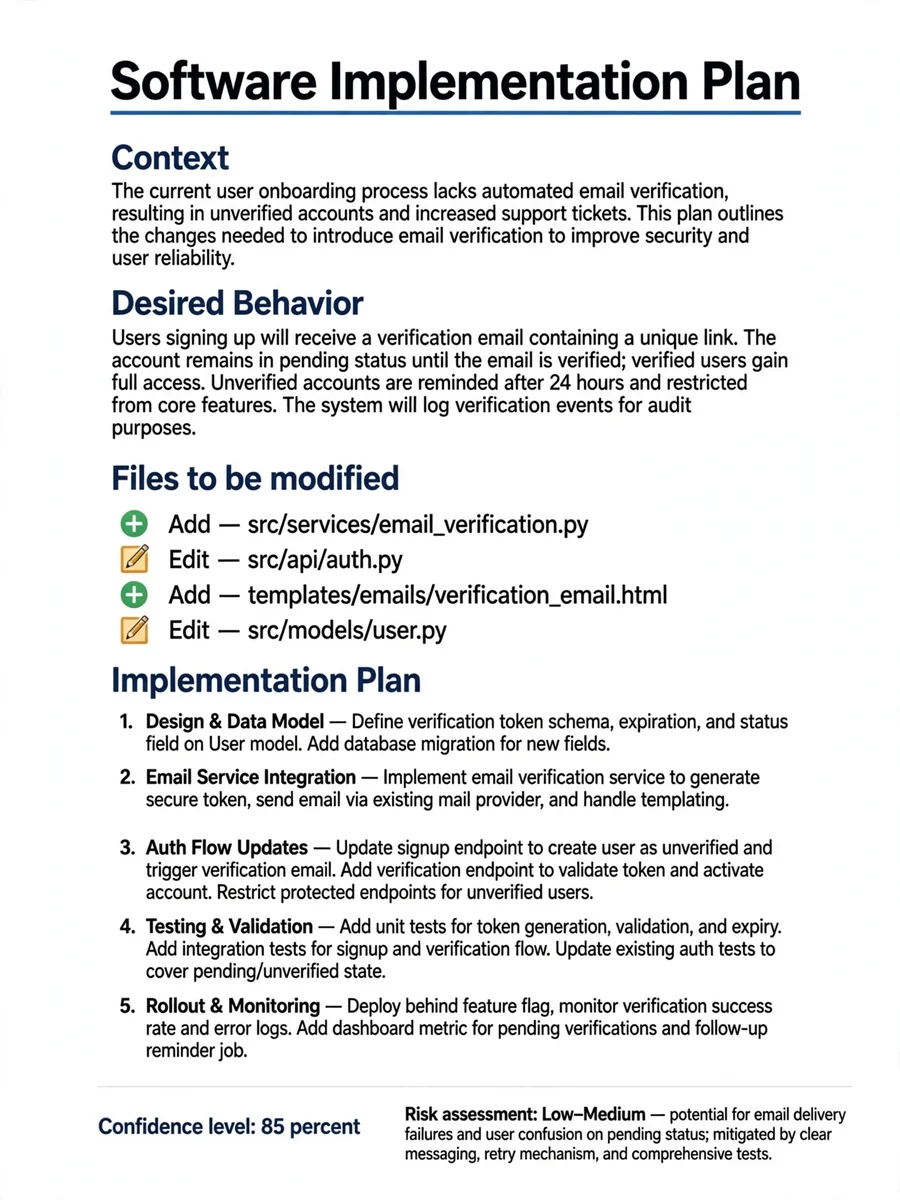
Present — ChatGPT Prompt
The Prompt
### Context [Why are we doing the change?] ### Desired Behavior [What is the desired behavior ?] ### Instruction Explain your comprehension of the requirements. List 5 hypotheses you would like me to validate. Create a plan to implement the ${desired_behavior} ### Symbol and action ➕ Add : Represent the creation of a new file ✏️ Edit : Represent the edition of an existing file ❌ Delete : Represent the deletion of an existing file ### Files to be modified * The list of files list the files you request to add, modify or delete * Use the ${symbol_and_action} to represent the operation * Display the ${symbol_and_action} before the file name * The symbol and the action must always be displayed together. ** For exemple you display “➕ Add : GameModePuzzle.tsx” ** You do NOT display “➕ GameModePuzzle.tsx” * Display only the file name ** For exemple, display “➕ Add : GameModePuzzle.tsx” * DO NOT display the path of the file. ** For example, do not display “➕ Add : components/game/GameModePuzzle.tsx” ### Plan * Identify the name of the plan as a title. * The title must be in bold. * Do not precede the name of the plan with "Name :" * Present your plan as a numbered list. * Each step title must be in bold. * Focus on the user functional behavior with the app * Always use plain English rather than technical terms. * Strictly avoid writing out function signatures (e.g., myFunction(arg: type): void). * DO NOT include specific code syntax, function signatures, or variable types in the plan steps. * When mentioning file names, use bold text. **After the plan, provide** * Confidence level (0 to 100%). * Risk assessment (likelihood of breaking existing features). * Impacted files (See ${files_to_be_modified}) ### Constraints * DO NOT GENERATE CODE YET. * Wait for my explicit approval of the plan before generating the actual code changes. * Designate this plan as the “Current plan”
Make it yours
Describe one change and free AI rewrites this prompt for you.
Works with
ChatGPT, Gemini, Claude - copy and paste. For images, use it with Midjourney, DALL-E, or Gemini image mode.
Tip: swap names, colors, or details to make it yours. Shorter prompts often work better - remove lines you don't need.
Related Prompts

Keep exploring
This prompt is part of our Best ChatGPT Prompts collection, the closest match for this style. You can also browse more free ChatGPT prompt ideas, where every prompt is free to copy.
For ideas beyond this topic, discover more free AI prompts on PromptBee.