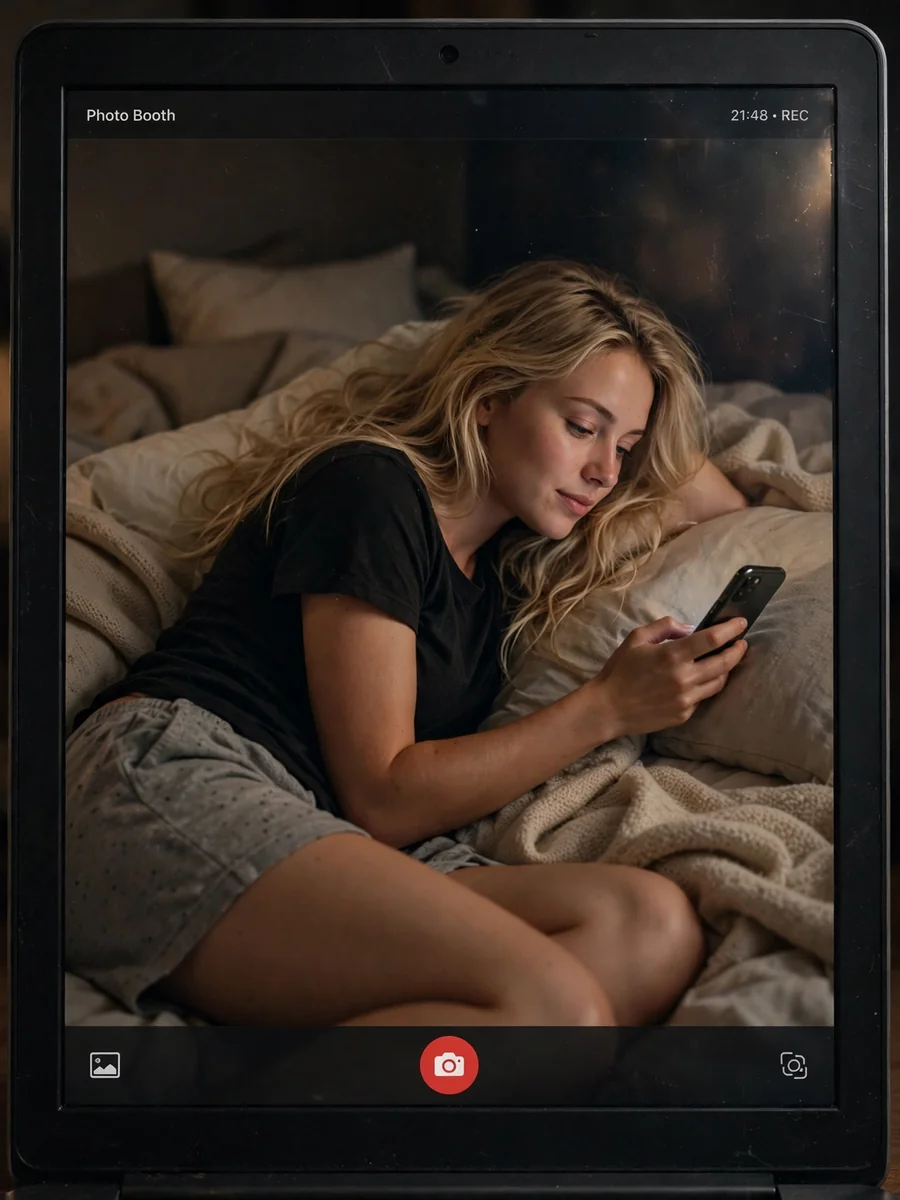
Act as a Photorealistic Webcam Bedroom Scene Prompt — ChatGPT Prompt
The Prompt
{ "subject": { "description": "A young woman lying on a bed, holding a smartphone and looking at the screen with a calm, slightly focused expression.", "body": { "type": "female, slim build", "details": "light skin tone, long blonde hair, natural makeup with defined eyes and lips", "pose": "lying on her side on a bed, upper body slightly raised, one arm holding a phone in front of her face, the other arm resting on the bed" }, "face": { "expression": "neutral, relaxed, slightly focused", "gaze_direction": "looking at her phone screen", "head_tilt": "slight downward tilt" }, "wardrobe": { "top": "black casual t-shirt", "bottom": "soft fabric pajama shorts", "style": "comfortable indoor loungewear / pajama outfit" }, "hair": "long blonde hair, straight and slightly voluminous, falling naturally around shoulders" }, "scene": { "description": "A bedroom scene captured through a laptop screen using a camera app interface.", "location": "indoor bedroom", "setting": "bed with soft blankets and pillows", "background_elements": "neutral wall, slightly messy bedding, soft fabric textures", "lighting": "low ambient indoor lighting with soft warm tones", "atmosphere": "cozy, intimate, relaxed night-time vibe" }, "environment": { "ambience": "dimly lit, quiet indoor environment", "style": "candid digital capture through screen", "depth_of_field": "subject clear within the screen, slight softness overall" }, "camera": { "device": "laptop camera (MacBook Photo Booth style)", "angle": "slightly elevated screen perspective", "aspect_ratio": "4:3 within screen frame", "framing": "the subject appears inside the laptop display, with the laptop bezel partially visible", "focus": "moderate focus, slightly soft typical webcam quality" }, "interface": { "visible_ui": "Photo Booth application interface visible on screen", "elements": "top bar with 'Photo Booth' text, bottom center red shutter button, small UI icons", "screen_effect": "subtle screen glare, pixel softness, digital display look" }, "image_quality": { "resolution": "webcam-like quality", "grain": "visible digital noise due to low light", "sharpness": "slightly soft, not highly detailed", "compression_artifacts": "minor digital artifacts", "dynamic_range": "limited, darker shadows with some highlight softness" }, "lighting": { "type": "low indoor ambient light", "quality": "soft, slightly uneven, warm tones", "effects": "gentle shadows, subtle highlights on face" }, "color_grading": { "tone": "warm and muted", "temperature": "slightly warm", "contrast": "low to moderate", "saturation": "slightly reduced, natural indoor tones" }, "rendering": { "style": "photorealistic webcam capture", "quality": "intentionally imperfect, screen-captured feel", "skin_texture": "natural, slightly softened by low resolution", "post_processing": "minimal, raw webcam look" }, "artifacts": { "screen_glare": "subtle reflections on laptop screen", "noise_pattern": "visible low-light grain", "chromatic_aberration": "minimal", "motion_blur": "none" }, "constraints": { "focus_priority": "subject inside the screen is the main focus", "avoid": "overly sharp DSLR look, studio lighting, artificial filters" } }
Make it yours
Describe one change and free AI rewrites this prompt for you.
Works with
ChatGPT, Gemini, Claude - copy and paste. For images, use it with Midjourney, DALL-E, or Gemini image mode.
Tip: swap names, colors, or details to make it yours. Shorter prompts often work better - remove lines you don't need.
Related Prompts

Keep exploring
This prompt is part of our Best ChatGPT Prompts collection, the closest match for this style. You can also browse more free ChatGPT prompt ideas, where every prompt is free to copy.
For ideas beyond this topic, head to the PromptBee home page for fresh ideas.