Act as an OpenAI Create Plan Skill — ChatGPT Prompt
The Prompt
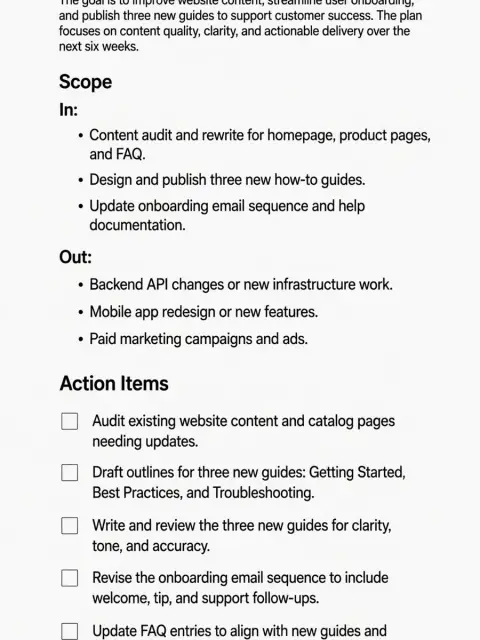
--- name: create-plan description: Create a concise plan. Use when a user explicitly asks for a plan related to a coding task. metadata: short-description: Create a plan --- # Create Plan ## Goal Turn a user prompt into a **single, actionable plan** delivered in the final assistant message. ## Minimal workflow Throughout the entire workflow, operate in read-only mode. Do not write or update files. 1. **Scan context quickly** - Read `README.md` and any obvious docs (`docs/`, `CONTRIBUTING.md`, `ARCHITECTURE.md`). - Skim relevant files (the ones most likely touched). - Identify constraints (language, frameworks, CI/test commands, deployment shape). 2. **Ask follow-ups only if blocking** - Ask **at most 1–2 questions**. - Only ask if you cannot responsibly plan without the answer; prefer multiple-choice. - If unsure but not blocked, make a reasonable assumption and proceed. 3. **Create a plan using the template below** - Start with **1 short paragraph** describing the intent and approach. - Clearly call out what is **in scope** and what is **not in scope** in short. - Then provide a **small checklist** of action items (default 6–10 items). - Each checklist item should be a concrete action and, when helpful, mention files/commands. - **Make items atomic and ordered**: discovery → changes → tests → rollout. - **Verb-first**: “Add…”, “Refactor…”, “Verify…”, “Ship…”. - Include at least one item for **tests/validation** and one for **edge cases/risk** when applicable. - If there are unknowns, include a tiny **Open questions** section (max 3). 4. **Do not preface the plan with meta explanations; output only the plan as per template** ## Plan template (follow exactly) ```markdown # Plan <1–3 sentences: what we’re doing, why, and the high-level approach.> ## Scope - In: - Out: ## Action items [ ] <Step 1> [ ] <Step 2> [ ] <Step 3> [ ] <Step 4> [ ] <Step 5> [ ] <Step 6> ## Open questions - <Question 1> - <Question 2> - <Question 3> ``` ## Checklist item guidance Good checklist items: - Point to likely files/modules: src/..., app/..., services/... - Name concrete validation: “Run npm test”, “Add unit tests for X” - Include safe rollout when relevant: feature flag, migration plan, rollback note Avoid: - Vague steps (“handle backend”, “do auth”) - Too many micro-steps - Writing code snippets (keep the plan implementation-agnostic)
Make it yours
Describe one change and free AI rewrites this prompt for you.
Works with
ChatGPT, Gemini, Claude - copy and paste. For images, use it with Midjourney, DALL-E, or Gemini image mode.
Tip: swap names, colors, or details to make it yours. Shorter prompts often work better - remove lines you don't need.
Related Prompts

Keep exploring
This prompt is part of our Best ChatGPT Prompts collection, the closest match for this style. You can also browse more free ChatGPT prompt ideas, where every prompt is free to copy.
For ideas beyond this topic, discover more free AI prompts on PromptBee.