Act as an Ominous Clown Cosplay Duo Portrait — ChatGPT Prompt
The Prompt
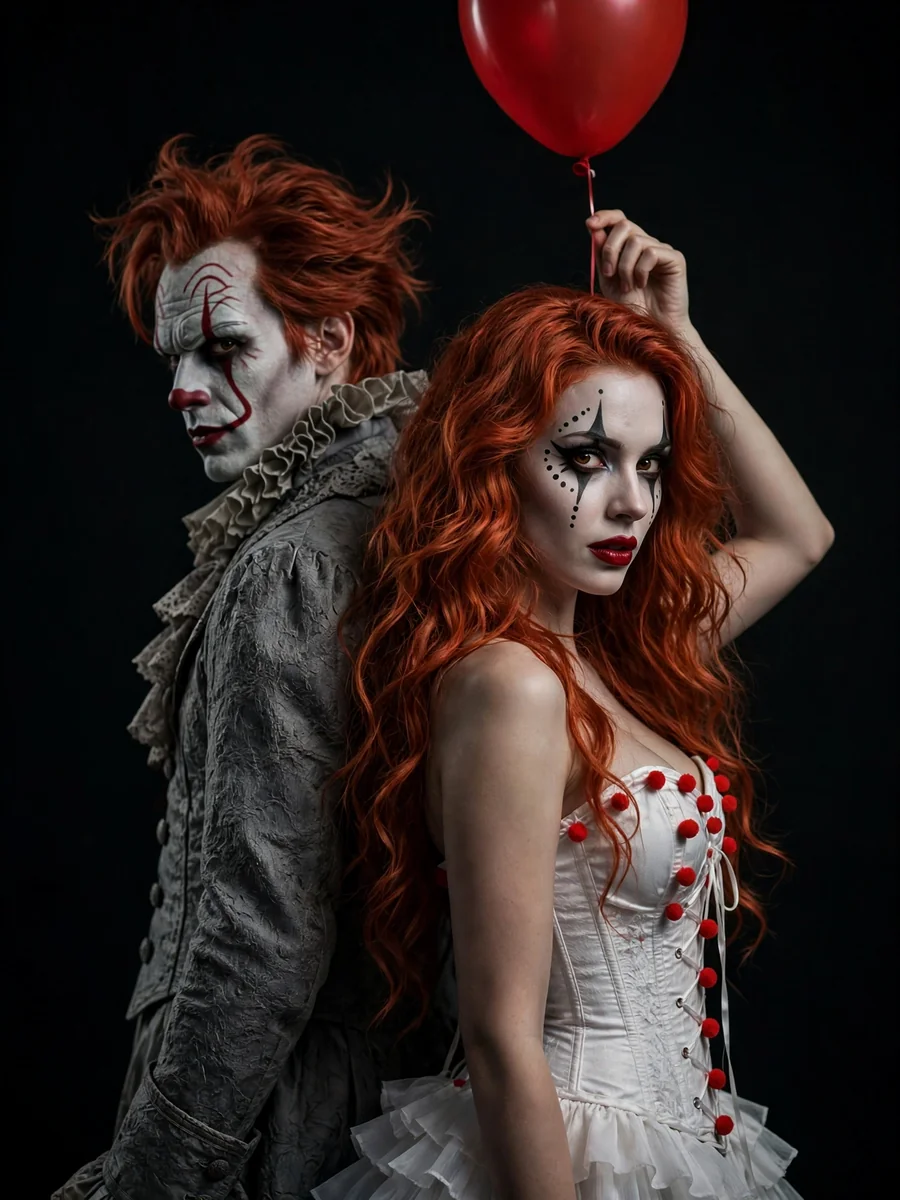
A rich, atmospheric vertical medium shot featuring two cosplayers in detailed costumes against a deep, completely black background, creating a sense of isolation and darkness. The female cosplayer stands with her back to the man, turning her head over her shoulder to look directly into the camera. She has long, wavy, vibrant copper-red hair flowing freely over her shoulders. Her makeup is stylized clown makeup — a white-painted face, red lipstick, expressive black lines and dots around the eyes, and blush — creating a look that is both frightening and fashionable. She wears a white corset-style top with red pom-poms on the front and off-the-shoulder styling, paired with a layered white ruffled skirt. She holds the string of a single bright red helium balloon floating above her head. Standing directly behind her, back-to-back, is a male cosplayer portraying Pennywise from the 2017 film IT. He has detailed, creepy Pennywise makeup with a white face, distinctive red lines extending from the corners of his mouth through the eyes to the forehead, and a terrifying grin with visible uneven teeth. His messy red Pennywise hair is styled backward and upward. He wears a classic gray Victorian clown costume with layered ruffles around the collar and cuffs, decorated with red pom-poms. He looks straight ahead, appearing stern and threatening. Low-intensity, dramatic, high-contrast lighting with strong chiaroscuro shadows emphasizes the textures of the costumes and makeup while leaving the rest of the scene in deep shadow. The light source is positioned in front and slightly above. Limited color palette: deep black, gray, white, and vivid red. Dark, ominous, mysterious, and tense mood. Eye-level camera, vertical composition, focused on the interaction and contrast between the two characters. Highly detailed, realistic skin and fabric textures. Do not change the facial features or identity of the woman from the reference image. Format: 3:4 Realistic, high-quality, sharp 8K photograph, shot on an iPhone 16 Pro.
Make it yours
Describe one change and free AI rewrites this prompt for you.
Works with
CapCut, VN Video Editor, Runway, Pika, Kaiber - paste the prompt or use it as a video idea.
Tip: swap names, colors, or details to make it yours. Shorter prompts often work better - remove lines you don't need.
How to use this video prompt (step by step)
In CapCut: 1) Open CapCut and start a new project. 2) Add your clips or photos in the order the prompt describes. 3) Tap "Text" to add the captions from the prompt. 4) Go to "Effects" and pick transitions that match the mood. 5) Export in 1080p and share.
In VN Video Editor: 1) Create a new project in VN. 2) Import your media following the prompt's shot list. 3) Use the "Text" tool for titles and the "Music" tab for trending audio. 4) Apply filters lightly - don't overdo it. 5) Export and post.
In AI video tools (Runway, Pika, Kaiber): Copy the prompt above and paste it directly as your text prompt. Adjust the camera-movement words (like "slow zoom" or "pan left") to control the motion.
Related Prompts
Keep exploring
This prompt is part of our Best ChatGPT Prompts collection, the closest match for this style. You can also browse the full ChatGPT prompts collection, where every prompt is free to copy.
For ideas beyond this topic, explore the newest prompts on the homepage.