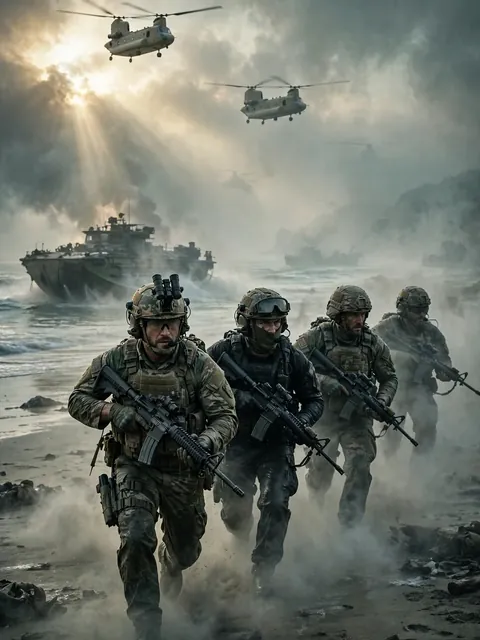
Act as a Military Action Montage Vertical Short — ChatGPT Prompt
The Prompt
Here's a full creative package for turning this into a punchy vertical short — a generation/editing prompt plus a shot-by-shot breakdown with camera angles and captions. ## Video Prompt (for editing brief / AI video generation) > A high-intensity military action montage in vertical 9:16 format, cut for YouTube Shorts/TikTok. Modern warfare aesthetic — desaturated greens and grays, handheld camera shake, muzzle flashes, smoke, and explosions lit by harsh tactical flashlights. Fast-paced editing synced to a rising bass drop, cutting between an interrogation-style dialogue in a dim room, amphibious beach assault chaos, and a tense one-on-one confrontation between two soldiers. Tone escalates from cold, calculated menace to full combat adrenaline, ending on an emotional gut-punch close-up. Grainy film texture, cinematic color grade, quick zoom punches on key lines. ## Shot-by-Shot: Camera Angles + Captions **0:04–0:19 — Cold open, the "line" dialogue** - Camera: Tight two-shot, shallow depth of field, slow push-in on speaker's face - Caption: `"There's a line. We don't cross it."` (bold white, center-low third) - Cut on: "draw the line where we need it" → quick zoom punch **0:19–0:29 — Villain monologue** - Camera: Low angle looking up (power shot), slight Dutch tilt for menace - Caption: `"Fight fire... with fire. 🔥"` fades in word-by-word **0:29–0:46 — War room briefing** - Camera: Over-the-shoulder on map/screen, then cut to wide static shot of the room - Caption: `"Shut down the peninsula. Then invade."` (red accent text on last word) - Add subtitle-style name tag: "Chairman Ri Sung Ho" lower third, fades fast **0:47–0:57 — Beach assault chaos** - Camera: Shaky handheld, whip pans, POV-style close to ground - Caption: quick flashing text `"LET'S GO!"` `"MOVE!"` synced to shouts, glitch effect - Sound design cue: hard cut on gunfire hits **0:57–1:10 — Betrayal confrontation** - Camera: Close-up handheld, slight shake, snap zoom on "cartel?" line - Caption: `"You're working with the CARTEL?"` (CARTEL in red, shaking text animation) **1:10–1:25 — Mission briefing / Price reveal** - Camera: Static medium shot, hard cut to close-up on name reveal - Caption: `"The target... is Price."` — dramatic pause beat (freeze frame half a second) **1:25–1:46 — Beach combat sequence** - Camera: Rapid cuts, tracking shot following a soldier running, low-angle explosion shots - Caption: `"We hit them like they hit us."` bold impact font, screen-shake sync **1:46–2:00 — "Weapon of war" tension** - Camera: Slow-motion insert shot on the weapon/object, then snap back to real-time - Caption: `"What happens when it reaches the Archer?"` typewriter reveal effect **2:00–2:19 — Simon (Ghost) confrontation — emotional peak** - Camera: Extreme close-up, static, no camera movement (let the dialogue breathe) - Caption: `"You broke her jaw."` then beat, then `"I'll make you cry for mercy."` - Final line "Dad!" — camera whip-cuts to reaction shot, caption removed entirely for raw impact **2:19–end — Closing tagline** - Camera: Slow pull-back or fade to black - Caption: `"The things you're going to see..."` fading to logo/title card ## General Shorts Editing Notes - **Pacing:** cuts should get faster as the video progresses — start ~2-3 sec holds, drop to sub-1-second cuts during combat - **Captions:** use a bold sans-serif (e.g., Montserrat Black or Anton), high-contrast white/red, auto-synced karaoke-style highlighting for key lines - **Music:** low cinematic drone under dialogue, hard bass drop at the beach assault, silence/tension pull before the "Dad!" line for maximum impact - **Hook (first 3 sec):** since Shorts live/die on the first second, consider opening on the "Dad!" moment or the cartel reveal as a cold-open hook, then flash back — that's a stronger scroll-stopper than the line-in-the-sand opener Want me to also draft 3-4 alternate hook/title text options to test for the thumbnail or opening caption?
Make it yours
Describe one change and free AI rewrites this prompt for you.
Works with
CapCut, VN Video Editor, Runway, Pika, Kaiber - paste the prompt or use it as a video idea.
Tip: swap names, colors, or details to make it yours. Shorter prompts often work better - remove lines you don't need.
How to use this video prompt (step by step)
In CapCut: 1) Open CapCut and start a new project. 2) Add your clips or photos in the order the prompt describes. 3) Tap "Text" to add the captions from the prompt. 4) Go to "Effects" and pick transitions that match the mood. 5) Export in 1080p and share.
In VN Video Editor: 1) Create a new project in VN. 2) Import your media following the prompt's shot list. 3) Use the "Text" tool for titles and the "Music" tab for trending audio. 4) Apply filters lightly - don't overdo it. 5) Export and post.
In AI video tools (Runway, Pika, Kaiber): Copy the prompt above and paste it directly as your text prompt. Adjust the camera-movement words (like "slow zoom" or "pan left") to control the motion.
Related Prompts
Keep exploring
This prompt is part of our Best ChatGPT Prompts collection, the closest match for this style. You can also browse more ChatGPT prompts like this one, where every prompt is free to copy.
For ideas beyond this topic, see what is trending on the PromptBee homepage.