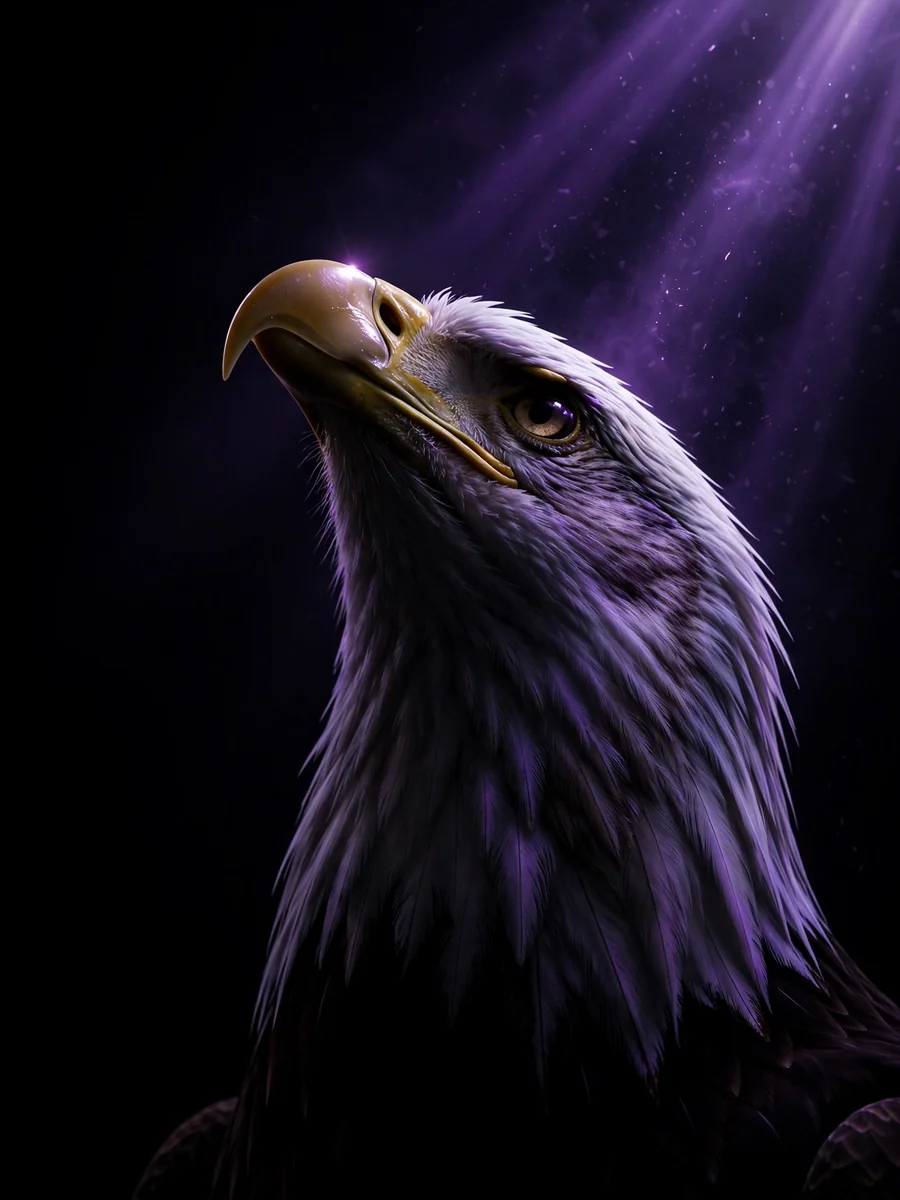
Act as a Majestic Bald Eagle 3D Render Prompt — ChatGPT Prompt
The Prompt
{ "subject": { "description": "The head and upper neck of a bald eagle, looking upwards towards a light source.", "count": 1, "orientation": "profile, facing left, tilted steeply upward", "pose_or_state": "static, neck extended and head looking up", "expression": "majestic, neutral" }, "scale_and_proportion": { "subject_to_frame_ratio": "subject occupies approximately 40% of the frame, positioned in the center-right", "proportions": "anatomically accurate eagle head", "negative_space": "extensive negative space on the left and bottom of the frame" }, "composition": { "shot_type": "close-up", "camera_angle": "low angle, looking up at the subject", "framing": "subject positioned in the right half of the frame", "symmetry": "highly asymmetrical", "background": "pitch black with prominent diagonal volumetric light rays", "depth_of_field": "deep, light rays and illuminated subject features are in sharp focus" }, "temporal_context": { "era": "contemporary digital art", "modern_elements": false, "retro_stylization": false, "trend_influence": false }, "style": { "visual_type": "3D render", "realism_level": "maximum texture realism", "art_style": "none", "stylization": false, "interpretation": "literal reproduction only" }, "lighting": { "setup_type": "volumetric / rim lighting", "light_direction": "top right, casting rays downwards toward the bottom left", "light_quality": "hard volumetric beams (god rays)", "contrast": "extremely high, chiaroscuro effect", "shadow_behavior": "deep, absolute black shadows obscuring the lower half of the subject", "color_temperature": "very cool, monochromatic deep violet/purple", "lighting_variation": "none" }, "materials": { "primary_materials": [ "feathers", "keratin (beak)" ], "surface_finish": "matte feathers, semi-gloss beak", "light_reflection": "sharp glint on the upper curve of the beak, soft highlights on individual feather edges", "material_accuracy": "exact" }, "color_palette": { "dominant_colors": [ "Deep Purple (#32174d)", "Black (#000000)" ], "saturation": "high saturation in the purple light beams", "contrast_level": "maximum", "color_shift": false }, "texture_and_detail": { "surface_detail": "fine feather barbs and textures visible only where the light hits", "grain_noise": "none, perfectly clean digital render", "micro_details": "preserved beak texture and sharp edges of highlighted feathers", "sharpness": "sharp focus on the beak and top of the head" }, "camera_render_settings": { "lens_equivalent": "50mm", "perspective_distortion": "none", "aperture_look": "f/8 (deep focus)", "resolution": "high", "render_quality": "clean and neutral" }, "constraints": { "no_additional_objects": true, "no_reframing": true, "no_crop": true, "no_stylization": true, "no_artistic_license": true, "no_text": true, "no_watermark": true, "no_effects": true, "no_dramatic_lighting": false, "no_color_grading": true }, "iteration_instruction": { "compare_to_reference": true, "fix_geometry_first": true, "then_fix_composition": true, "then_fix_lighting": true, "then_fix_color": true, "ignore_aesthetic_improvements": true }, "negative_prompt": [ "creative", "cinematic", "artistic", "stylized", "illustration", "abstract", "dramatic", "wide-angle", "fisheye", "exaggeration", "reinterpretation", "extra elements", "modernized", "retro look", "color grading", "AI artifacts", "warm colors", "visible background elements" ] }
Make it yours
Describe one change and free AI rewrites this prompt for you.
Works with
ChatGPT, Gemini, Claude - copy and paste. For images, use it with Midjourney, DALL-E, or Gemini image mode.
Tip: swap names, colors, or details to make it yours. Shorter prompts often work better - remove lines you don't need.
Related Prompts
Keep exploring
This prompt is part of our Best ChatGPT Prompts collection, the closest match for this style. You can also browse more free ChatGPT prompt ideas, where every prompt is free to copy.
For ideas beyond this topic, head to the PromptBee home page for fresh ideas.