Kali Mata Text Reveal Video Prompt
The Prompt
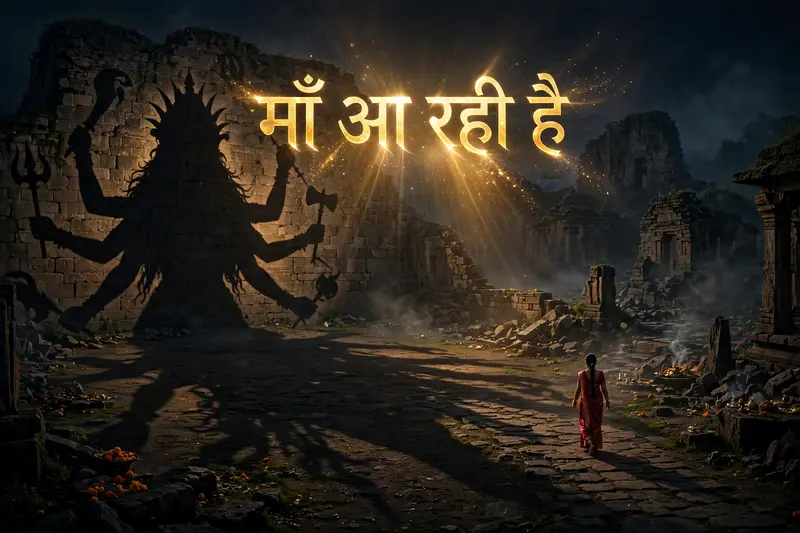
TEXT REVEAL – FINAL MOMENT: As the woman continues walking, the camera slowly pulls back to reveal more of Maa Kali’s enormous shadow. At the final moment, introduce the exact Hindi text: माँ आ रही है” The text appears dramatically over the ground in elegant, glowing golden Devanagari lettering, with a subtle divine golden shimmer and soft light rays. The text fades in smoothly as the music reaches its emotional climax. Keep the text perfectly spelled, clear, readable, and centered in the upper-middle portion of the frame without covering the woman or the most recognizable part of Maa Kali’s shadow. AUDIO & ATMOSPHERE: Powerful devotional cinematic background music with deep temple bells, a subtle damru rhythm, atmospheric wind, and a rising spiritual soundscape. Build anticipation toward the final text reveal.
Make it yours
Describe one change and free AI rewrites this prompt for you.
Works with
CapCut, VN Video Editor, Runway, Pika, Kaiber - paste the prompt or use it as a video idea.
Tip: swap names, colors, or details to make it yours. Shorter prompts often work better - remove lines you don't need.
How to use this video prompt (step by step)
In CapCut: 1) Open CapCut and start a new project. 2) Add your clips or photos in the order the prompt describes. 3) Tap "Text" to add the captions from the prompt. 4) Go to "Effects" and pick transitions that match the mood. 5) Export in 1080p and share.
In VN Video Editor: 1) Create a new project in VN. 2) Import your media following the prompt's shot list. 3) Use the "Text" tool for titles and the "Music" tab for trending audio. 4) Apply filters lightly - don't overdo it. 5) Export and post.
In AI video tools (Runway, Pika, Kaiber): Copy the prompt above and paste it directly as your text prompt. Adjust the camera-movement words (like "slow zoom" or "pan left") to control the motion.