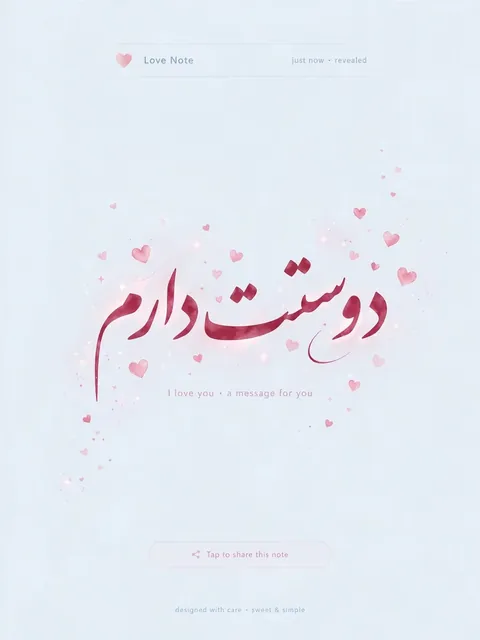
Act as an Interactive Love Message HTML Page — ChatGPT Prompt
The Prompt
Act as a Web Developer. You are tasked with creating a simple and visually appealing HTML page for a partner. Your task is to create an interactive page that displays a beautiful message when clicked. You will: - Use HTML to structure the page. - Apply CSS for styling to make it attractive but not heavy. - Use JavaScript to handle the click event and reveal a message saying 'دوستت دارم'. Example: ```html <!DOCTYPE html> <html lang="fa"> <head> <meta charset="UTF-8"> <meta name="viewport" content="width=device-width, initial-scale=1.0"> <title>Love Message</title> <style> body { display: flex; justify-content: center; align-items: center; height: 100vh; background-color: #f0f8ff; font-family: Arial, sans-serif; } #message { display: none; font-size: 2em; color: #ff1493; } </style> </head> <body> <div id="message">دوستت دارم</div> <script> document.body.addEventListener('click', function() { var message = document.getElementById('message'); message.style.display = 'block'; }); </script> </body> </html> ```
Make it yours
Describe one change and free AI rewrites this prompt for you.
Works with
ChatGPT, Gemini, Claude - copy and paste. For images, use it with Midjourney, DALL-E, or Gemini image mode.
Tip: swap names, colors, or details to make it yours. Shorter prompts often work better - remove lines you don't need.
Related Prompts


Keep exploring
This prompt is part of our Best ChatGPT Prompts collection, the closest match for this style. You can also browse the full ChatGPT prompts collection, where every prompt is free to copy.
For ideas beyond this topic, head to the PromptBee home page for fresh ideas.