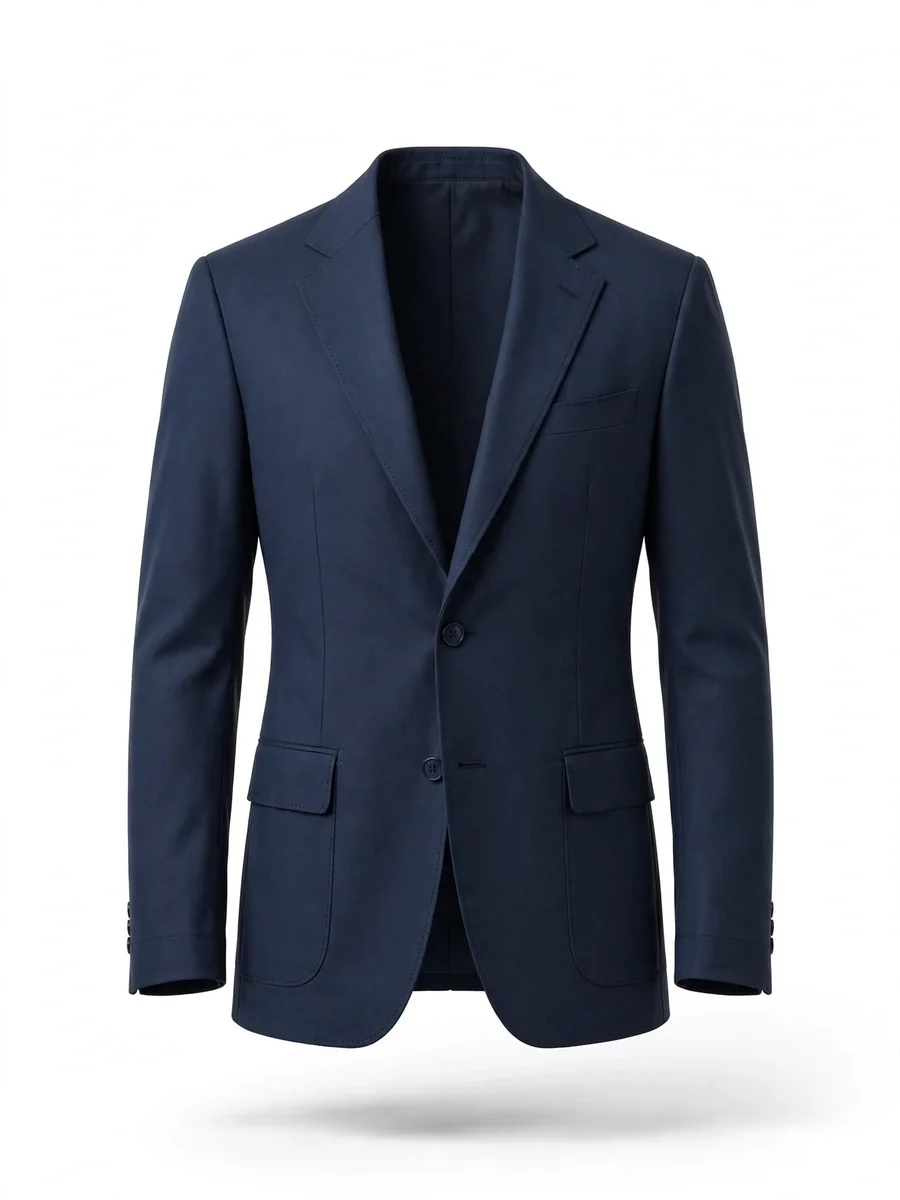
Act as an image to video 360 product rotaion — ChatGPT Prompt
The Prompt
{ "model": "veo-3.1", "task": "image_to_video_360_product_rotation", "objective": "Generate a photorealistic, silent, 360-degree rotation video from the provided front and back images of the exact same product. Preserve 100% of the original product identity without modification, addition, removal, or hallucination. The product must appear naturally filled internally using ghost mannequin volume reconstruction, while remaining completely faithful to the original images. The garment must appear professionally ironed, perfectly smooth, crisp, and retail-ready while preserving all original details. Output must contain absolutely no audio.", "garment_condition_global_rule": { "all_clothing_must_be_ironed": true, "appearance": "perfectly pressed, crisp, smooth, structured, premium retail presentation", "no_new_wrinkles": true, "no_random_fabric_folding": true, "maintain_original_wrinkle_data_if_present": true, "no_artificial_wrinkle_generation": true, "clean_finish": true, "brand_new_look": true }, "input": { "type": "multi_image", "views": [ { "name": "front", "role": "primary_reference", "weight": 1.0 }, { "name": "back", "role": "secondary_reference", "weight": 1.0 } ], "forensic_identity_lock": { "mode": "strict", "geometry_lock": true, "silhouette_lock": true, "mesh_lock": true, "texture_lock": true, "fabric_pattern_lock": true, "stitching_lock": true, "wrinkle_lock": true, "color_lock": true, "material_lock": true, "surface_lock": true, "logo_lock": true, "label_lock": true, "branding_lock": true, "proportion_lock": true, "measurement_lock": true, "prevent_hallucination": true, "prevent_detail_invention": true, "prevent_detail_removal": true } }, "geometry_reconstruction": { "method": "constrained_true_3d_reconstruction", "source_constraint": "only_use_information_present_in_input_images", "volume_generation": { "enabled": true, "type": "ghost_mannequin_volume", "visibility": "none" }, "reconstruction_rules": { "interpolate_only": true, "no_detail_creation": true, "no_surface_modification": true, "no_topology_change": true, "no_design_interpretation": true }, "mesh_constraints": { "rigid": true, "no_deformation": true, "no_shape_change": true, "no_texture_shift": true } }, "animation": { "type": "360_degree_rotation", "axis": "vertical", "degrees": 360, "direction": "clockwise", "speed": "constant", "duration_seconds": 6, "motion_constraints": { "no_wobble": true, "no_jitter": true, "no_mesh_change": true, "no_texture_shift": true, "no_geometry_shift": true }, "start_state": "exact_front_view", "end_state": "exact_front_view", "loop": true }, "ghost_mannequin": { "enabled": true, "visibility": "invisible", "constraints": { "must_not_be_visible": true, "must_not_modify_surface": true, "must_not_modify_shape": true, "must_not_modify_wrinkles": true, "must_not_modify_fit": true } }, "scene": { "background": { "type": "pure_white", "color": "#FFFFFF", "uniform": true }, "product_state": { "floating": true, "no_support_visible": true }, "shadow": { "type": "soft_contact", "stable": true, "physically_correct": true } }, "camera": { "type": "fixed", "movement": "none", "rotation": "none", "zoom": "none", "center_lock": true, "lens": "85mm", "distortion": false }, "lighting": { "type": "studio_softbox", "consistency": "locked", "variation": false, "flicker": false, "must_not_change_during_rotation": true }, "rendering": { "mode": "photorealistic", "texture_source": "input_images_only", "no_texture_generation": true, "no_creative_interpretation": true, "no_artificial_enhancement": true, "fabric_finish": "smooth_pressed_clean", "retail_presentation_standard": "premium_ecommerce_ready" }, "audio": { "enabled": false, "generate_audio": false, "include_audio_track": false, "music": false, "sound_effects": false, "voice": false, "ambient_sound": false, "silence": true }, "output": { "resolution": "2160x2160", "fps": 30, "duration_seconds": 6, "format": "mp4", "video_codec": "H.264", "audio_codec": "none", "include_audio_track": false, "loop": true, "background": "pure_white", "silent": true }, "hard_constraints": [ "NO audio", "NO music", "NO sound effects", "NO voice", "NO ambient sound", "DO NOT add details", "DO NOT remove details", "DO NOT modify stitching", "DO NOT modify logos", "DO NOT modify texture", "DO NOT modify structure", "DO NOT change proportions", "DO NOT stylize", "DO NOT hallucinate", "NO new wrinkles", "NO messy fabric folds", "MUST appear professionally ironed" ], "negative_prompt": [ "music", "sound", "voice", "audio", "ambient audio", "sound effects", "hallucinated details", "modified stitching", "different fabric", "shape morphing", "geometry distortion", "creative reinterpretation", "wrinkled fabric", "messy folds", "creased clothing", "unpressed garment" ] }
Make it yours
Describe one change and free AI rewrites this prompt for you.
Works with
CapCut, VN Video Editor, Runway, Pika, Kaiber - paste the prompt or use it as a video idea.
Tip: swap names, colors, or details to make it yours. Shorter prompts often work better - remove lines you don't need.
How to use this video prompt (step by step)
In CapCut: 1) Open CapCut and start a new project. 2) Add your clips or photos in the order the prompt describes. 3) Tap "Text" to add the captions from the prompt. 4) Go to "Effects" and pick transitions that match the mood. 5) Export in 1080p and share.
In VN Video Editor: 1) Create a new project in VN. 2) Import your media following the prompt's shot list. 3) Use the "Text" tool for titles and the "Music" tab for trending audio. 4) Apply filters lightly - don't overdo it. 5) Export and post.
In AI video tools (Runway, Pika, Kaiber): Copy the prompt above and paste it directly as your text prompt. Adjust the camera-movement words (like "slow zoom" or "pan left") to control the motion.
Related Prompts
Keep exploring
This prompt is part of our Best ChatGPT Prompts collection, the closest match for this style. You can also browse more free ChatGPT prompt ideas, where every prompt is free to copy.
For ideas beyond this topic, check the latest additions on the PromptBee homepage.