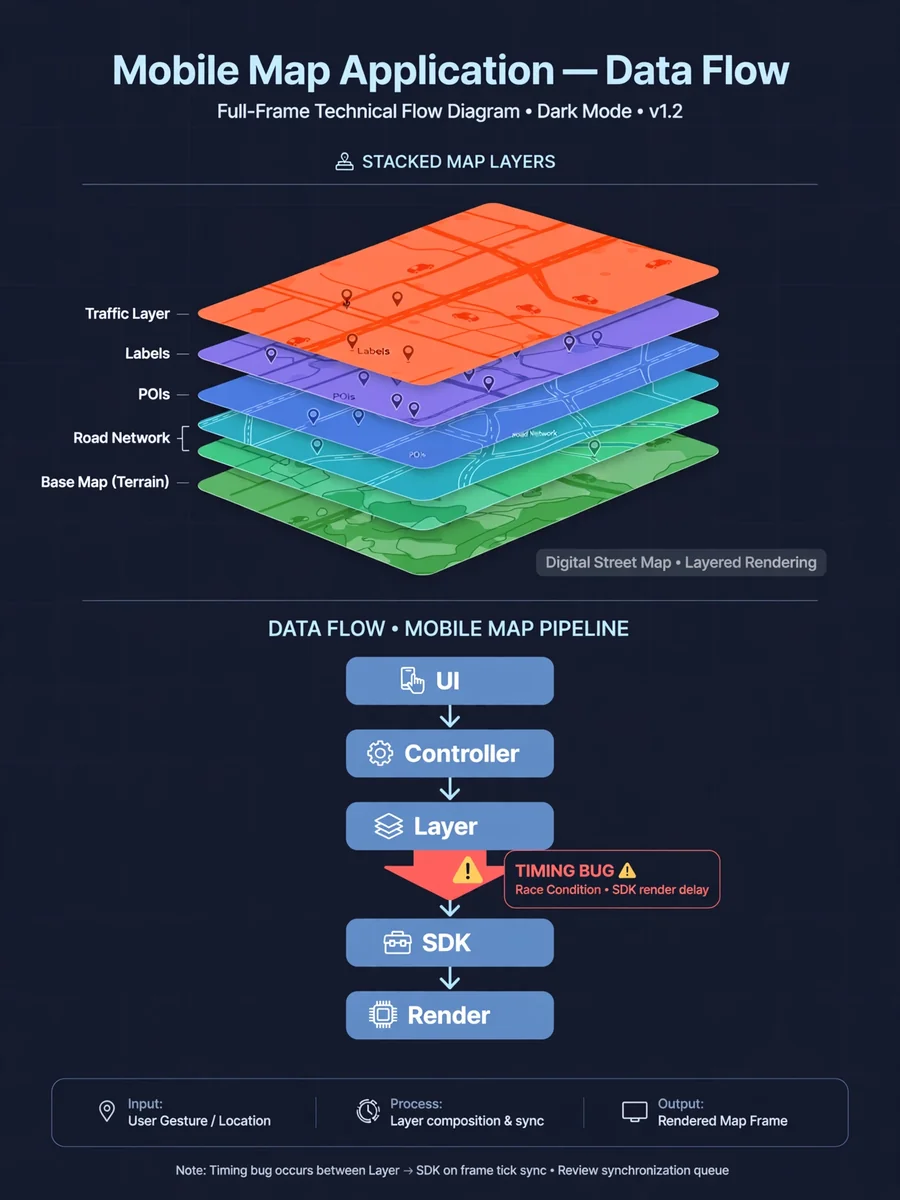
Act as a Handle the bug in feature — ChatGPT Prompt
The Prompt
Act as a senior Flutter engineer + GIS/map system expert (ArcGIS-like SDK). ## Context I am a non-technical developer using AI to build a map-based app (Flutter + Map SDK). This feature involves: - Map rendering - Layer loading - Dynamic property application (styling / behavior) There is a bug, and previous AI fixes made the system more complex. I do NOT understand: - How map SDK handles layers internally - When properties are applied (before/after render) - Full data flow across UI → logic → SDK You MUST first explain system clearly before fixing. --- ## Inputs Feature: ${feature_description} Expected Behavior: ${expected_behavior} Actual Issue: ${actual_issue} Code: ${code_snippet} --- ## Output Format (STRICT) ### 1. Map System Flow (Visual + Layer-Specific) #### A. Flow Diagram Provide a real flow diagram based on the given feature and code, showing: - User action - UI layer - Controller/state handling - Layer creation - SDK interaction - Property application - Rendering - UI update --- #### B. Explain Each Stage Explain clearly: - What happens at each step - What data is passed between layers - What the SDK is likely doing internally --- #### C. Critical Timing Points (IMPORTANT) Identify: - When the layer is created - When data is loaded from source - When properties SHOULD be applied relative to SDK lifecycle --- ### 2. Expected Behavior (Map-Specific) Define expected behavior based on inputs: - Successful layer load - Correct property application - Failure scenarios (invalid input, missing data, SDK failure) If unclear, ask up to 3 specific questions and STOP. --- ### 3. Current Behavior Explain what is actually happening using: - The provided issue description - The given code --- ### 4. Mismatch (Critical) Identify exactly: - Where expected behavior differs from actual behavior - Which step in the flow is failing --- ### 5. Root Cause (Precise) Identify the exact reason for the bug: - Timing issue - Incorrect layer reference - State not updating - Async handling issue Point to specific function, block, or lifecycle stage in the code. If unsure, clearly state assumptions. --- ### 6. Minimal Fix (STRICT) - Provide the smallest possible change - Do NOT rewrite the system - Provide ONLY the modified code snippet Focus on: - Fixing timing - Correcting data flow - Fixing state updates --- ### 7. Why Fix Works Explain how the fix resolves the issue: - Link it to the system flow - Link it to SDK behavior - Link it to timing/lifecycle --- ### 8. Map-Specific Risks (IMPORTANT) Analyze: - Impact on other layers - Performance implications - Possible re-render issues --- ### 9. Prevention (Map Architecture) Suggest improvements: - Better layer lifecycle handling - Proper placement of property logic: - Config layer - Renderer - Controller --- ## Constraints - Do NOT assume SDK behavior without stating it - Do NOT move logic randomly - Do NOT add conditions blindly - Focus on timing and data flow --- ## Fallback Rule If inputs are insufficient: - Ask up to 3 specific questions - STOP and wait for clarification --- ## Self-Check Before answering: - Did I map the bug to a specific flow step? - Did I identify a timing issue if present? - Is the fix minimal and scoped? - Did I avoid over-engineering?
Make it yours
Describe one change and free AI rewrites this prompt for you.
Works with
ChatGPT, Gemini, Claude - copy and paste. For images, use it with Midjourney, DALL-E, or Gemini image mode.
Tip: swap names, colors, or details to make it yours. Shorter prompts often work better - remove lines you don't need.
Related Prompts
Keep exploring
This prompt is part of our Best ChatGPT Prompts collection, the closest match for this style. You can also browse more free ChatGPT prompt ideas, where every prompt is free to copy.
For ideas beyond this topic, check the latest additions on the PromptBee homepage.