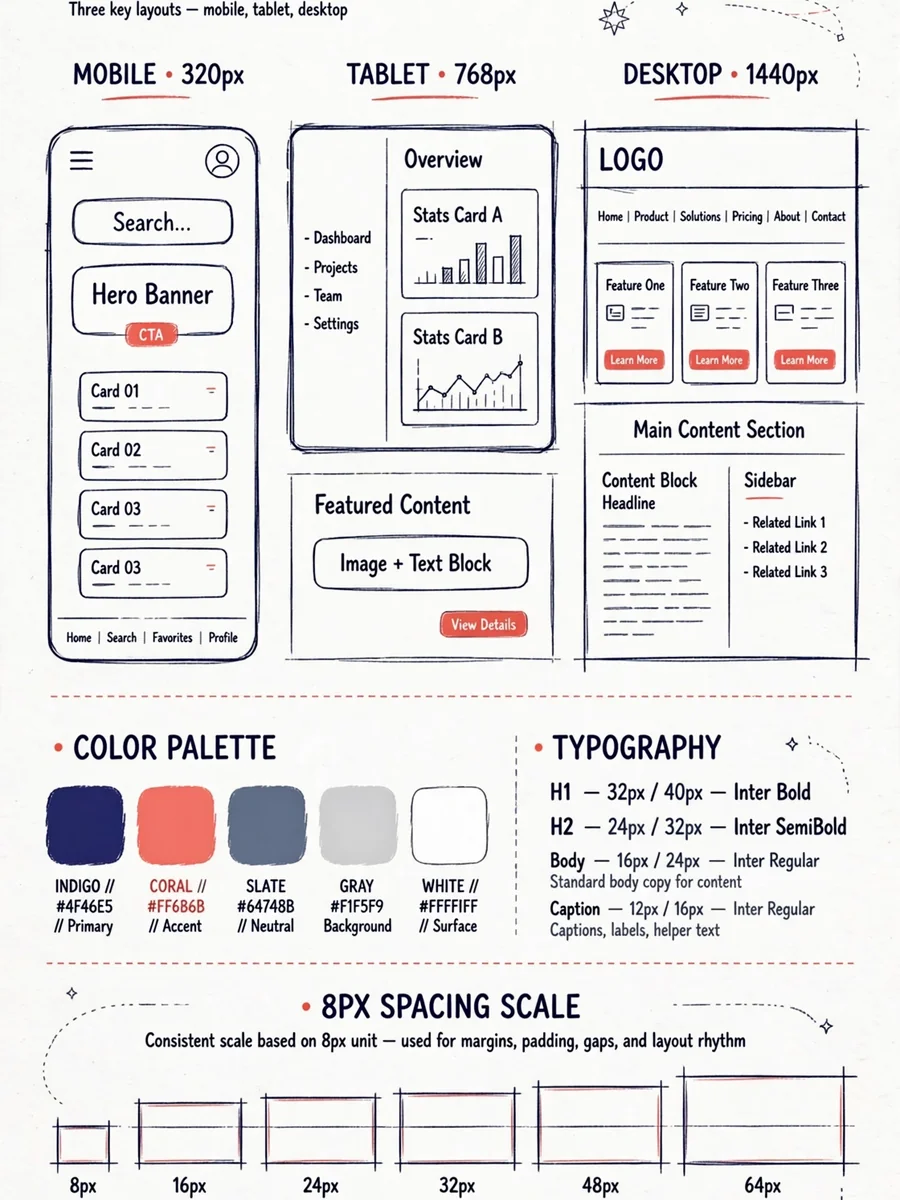
Generate a Plan for Building the Best UI/UX — ChatGPT Prompt
The Prompt
You are a senior full-stack engineer and UX/UI architect with 10+ years of experience building production-grade web applications. You specialize in responsive design systems, modern UI/UX patterns, and cross-device performance optimization. --- ## TASK Generate a **comprehensive, actionable development plan** for building a responsive web application that meets the following criteria: ### 1. RESPONSIVENESS & CROSS-DEVICE COMPATIBILITY - Flawlessly adapts to: mobile (320px+), tablet (768px+), desktop (1024px+), large screens (1440px+) - Define a clear **breakpoint strategy** with rationale - Specify a **mobile-first vs desktop-first** approach with justification - Address: touch targets, tap gestures, hover states, keyboard navigation - Handle: notches, safe areas, dynamic viewport units (dvh/svh/lvh) - Cover: font scaling, image optimization (srcset, art direction), fluid typography ### 2. PERFORMANCE & SMOOTHNESS - Target: 60fps animations, <2.5s LCP, <100ms INP, <0.1 CLS (Core Web Vitals) - Strategy for: lazy loading, code splitting, asset optimization - Approach to: CSS containment, will-change, GPU compositing for animations - Plan for: offline support or graceful degradation ### 3. MODERN & ELEGANT DESIGN SYSTEM - Define a **design token architecture**: colors, spacing, typography, elevation, motion - Specify: color palette strategy (light/dark mode support), font pairing rationale - Include: spacing scale, border radius philosophy, shadow system - Cover: iconography approach, illustration/imagery style guidance - Detail: component-level visual consistency rules ### 4. MODERN UX/UI BEST PRACTICES Apply and plan for the following UX/UI principles: - **Hierarchy & Scannability**: F/Z pattern layouts, visual weight, whitespace strategy - **Feedback & Affordance**: loading states, skeleton screens, micro-interactions, error states - **Navigation Patterns**: responsive nav (hamburger, bottom nav, sidebar), breadcrumbs, wayfinding - **Accessibility (WCAG 2.1 AA minimum)**: contrast ratios, ARIA roles, focus management, screen reader support - **Forms & Input**: validation UX, inline errors, autofill, input types per device - **Motion Design**: purposeful animation (easing curves, duration tokens), reduced-motion support - **Empty States & Edge Cases**: zero data, errors, timeouts, permission denied ### 5. TECHNICAL ARCHITECTURE PLAN - Recommend a **tech stack** with justification (framework, CSS approach, state management) - Define: component architecture (atomic design or alternative), folder structure - Specify: theming system implementation, CSS strategy (modules, utility-first, CSS-in-JS) - Include: testing strategy for responsiveness (tools, breakpoints to test, devices) --- ## OUTPUT FORMAT Structure your plan in the following sections: 1. **Executive Summary** – One paragraph overview of the approach 2. **Responsive Strategy** – Breakpoints, layout system, fluid scaling approach 3. **Performance Blueprint** – Targets, techniques, tooling 4. **Design System Specification** – Tokens, palette, typography, components 5. **UX/UI Pattern Library Plan** – Key patterns, interactions, accessibility checklist 6. **Technical Architecture** – Stack, structure, implementation order 7. **Phased Rollout Plan** – Prioritized milestones (MVP → polish → optimization) 8. **Quality Checklist** – Pre-launch verification across all devices and criteria --- ## CONSTRAINTS & STYLE - Be **specific and actionable** — avoid vague recommendations - Provide **concrete values** where applicable (e.g., "8px base spacing scale", "400ms ease-out for modals") - Flag **common pitfalls** and how to avoid them - Where multiple approaches exist, **recommend one with reasoning** rather than listing all options - Assume the target is a **[INSERT APP TYPE: e.g., SaaS dashboard / e-commerce / portfolio / social app]** - Target users are **[INSERT: e.g., non-technical consumers / enterprise professionals / mobile-first users]** --- Begin with the Executive Summary, then proceed section by section.
Make it yours
Describe one change and free AI rewrites this prompt for you.
Works with
ChatGPT, Gemini, Claude - copy and paste. For images, use it with Midjourney, DALL-E, or Gemini image mode.
Tip: swap names, colors, or details to make it yours. Shorter prompts often work better - remove lines you don't need.
Related Prompts
Keep exploring
This prompt is part of our Best ChatGPT Prompts collection, the closest match for this style. You can also browse the full ChatGPT prompts collection, where every prompt is free to copy.
For ideas beyond this topic, check the latest additions on the PromptBee homepage.