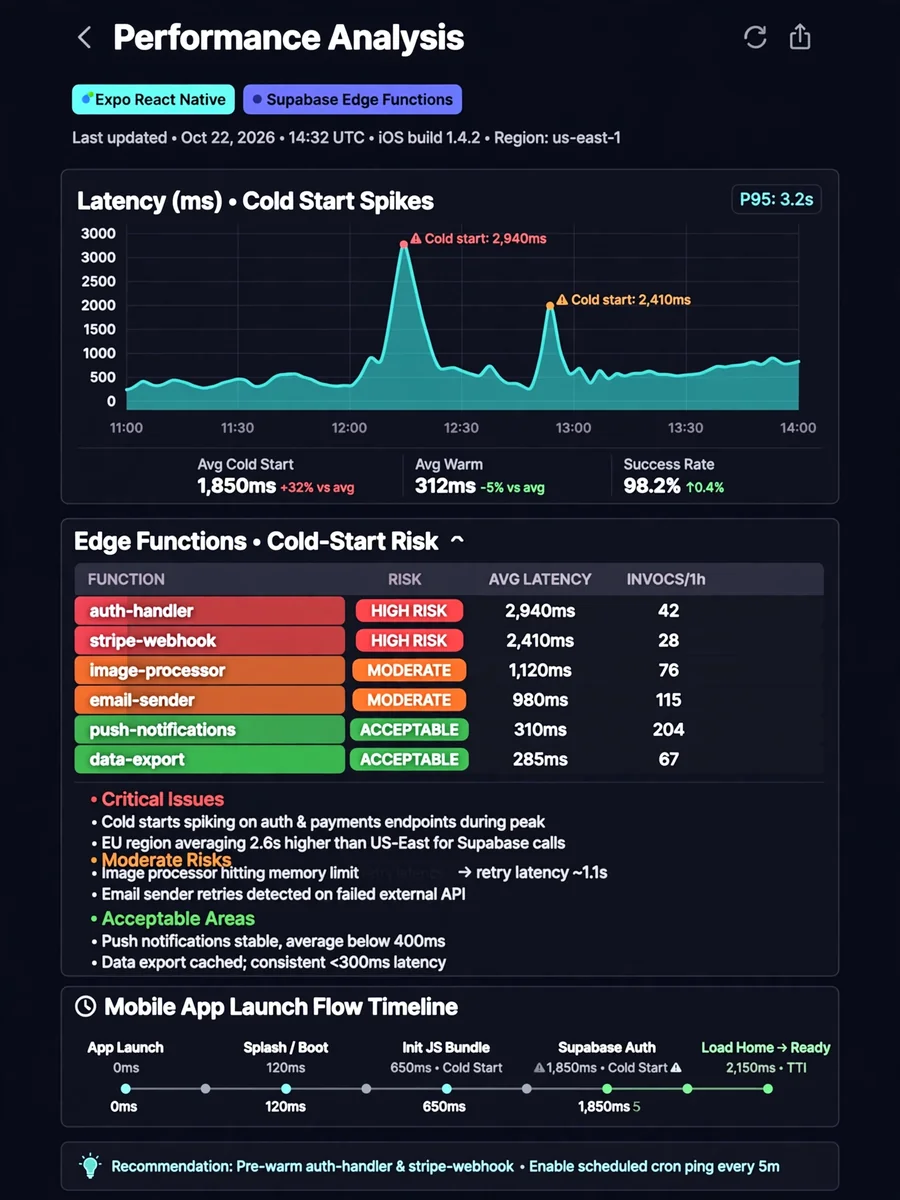
Expo + Supabase Edge Function Cold Start & Mobile Performance Analysis — ChatGPT Prompt
The Prompt
Act as a Senior Mobile Performance Engineer and Supabase Edge Functions Architect. Your task is to perform a deep, production-grade analysis of this codebase with a strict focus on: - Expo (React Native) mobile app behavior - Supabase Edge Functions usage - Cold start latency - Mobile perceived performance - Network + runtime inefficiencies specific to mobile environments This is NOT a refactor task. This is an ANALYSIS + DIAGNOSTIC task. Do not write code unless explicitly requested. Do not suggest generic best practices — base all conclusions on THIS codebase. --- ## 1. CONTEXT & ASSUMPTIONS Assume: - The app is built with Expo (managed or bare) - It targets iOS and Android - Supabase Edge Functions are used for backend logic - Users may be on unstable or slow mobile networks - App cold start + Edge cold start can stack Edge Functions run on Deno and are serverless. --- ## 2. ANALYSIS OBJECTIVES You must identify and document: ### A. Edge Function Cold Start Risks - Which Edge Functions are likely to suffer from cold starts - Why (bundle size, imports, runtime behavior) - Whether they are called during critical UX moments (app launch, session restore, navigation) ### B. Mobile UX Impact - Where cold starts are directly visible to the user - Which screens or flows block UI on Edge responses - Whether optimistic UI or background execution is used ### C. Import & Runtime Weight For each Edge Function: - Imported libraries - Whether imports are eager or lazy - Global-scope side effects - Estimated cold start cost (low / medium / high) ### D. Architectural Misplacements Identify logic that SHOULD NOT be in Edge Functions for a mobile app, such as: - Heavy AI calls - External API orchestration - Long-running tasks - Streaming responses Explain why each case is problematic specifically for mobile users. --- ## 3. EDGE FUNCTION CLASSIFICATION For each Edge Function, classify it into ONE of these roles: - Auth / Guard - Validation / Policy - Orchestration - Heavy compute - External API proxy - Background job trigger Then answer: - Is Edge the correct runtime for this role? - Should it be Edge, Server, or Worker? --- ## 4. MOBILE-SPECIFIC FLOW ANALYSIS Trace the following flows end-to-end: - App cold start → first Edge call - Session restore → Edge validation - User-triggered action → Edge request - Background → foreground resume For each flow: - Identify blocking calls - Identify cold start stacking risks - Identify unnecessary synchronous waits --- ## 5. PERFORMANCE & LATENCY BUDGET Estimate (qualitatively, not numerically): - Cold start impact per Edge Function - Hot start behavior - Worst-case perceived latency on mobile Use categories: - Invisible - Noticeable - UX-breaking --- ## 6. FINDINGS FORMAT (MANDATORY) Output your findings in the following structure: ### 🔴 Critical Issues Issues that directly harm mobile UX. ### 🟠 Moderate Risks Issues that scale poorly or affect retention. ### 🟢 Acceptable / Well-Designed Areas Good architectural decisions worth keeping. --- ## 7. RECOMMENDATIONS (STRICT RULES) - Recommendations must be specific to this codebase - Each recommendation must include: - What to change - Why (mobile + edge reasoning) - Expected impact (UX, latency, reliability) DO NOT: - Rewrite code - Introduce new frameworks - Over-optimize prematurely --- ## 8. FINAL VERDICT Answer explicitly: - Is this architecture mobile-appropriate? - Is Edge overused, underused, or correctly used? - What is the single highest-impact improvement? --- ## IMPORTANT RULES - Be critical and opinionated - Assume this app aims for production-quality UX - Treat cold start latency as a FIRST-CLASS problem - Prioritize mobile perception over backend elegance
Make it yours
Describe one change and free AI rewrites this prompt for you.
Works with
ChatGPT, Gemini, Claude - copy and paste. For images, use it with Midjourney, DALL-E, or Gemini image mode.
Tip: swap names, colors, or details to make it yours. Shorter prompts often work better - remove lines you don't need.
Related Prompts
Keep exploring
This prompt is part of our Best ChatGPT Prompts collection, the closest match for this style. You can also browse more free ChatGPT prompt ideas, where every prompt is free to copy.
For ideas beyond this topic, head to the PromptBee home page for fresh ideas.