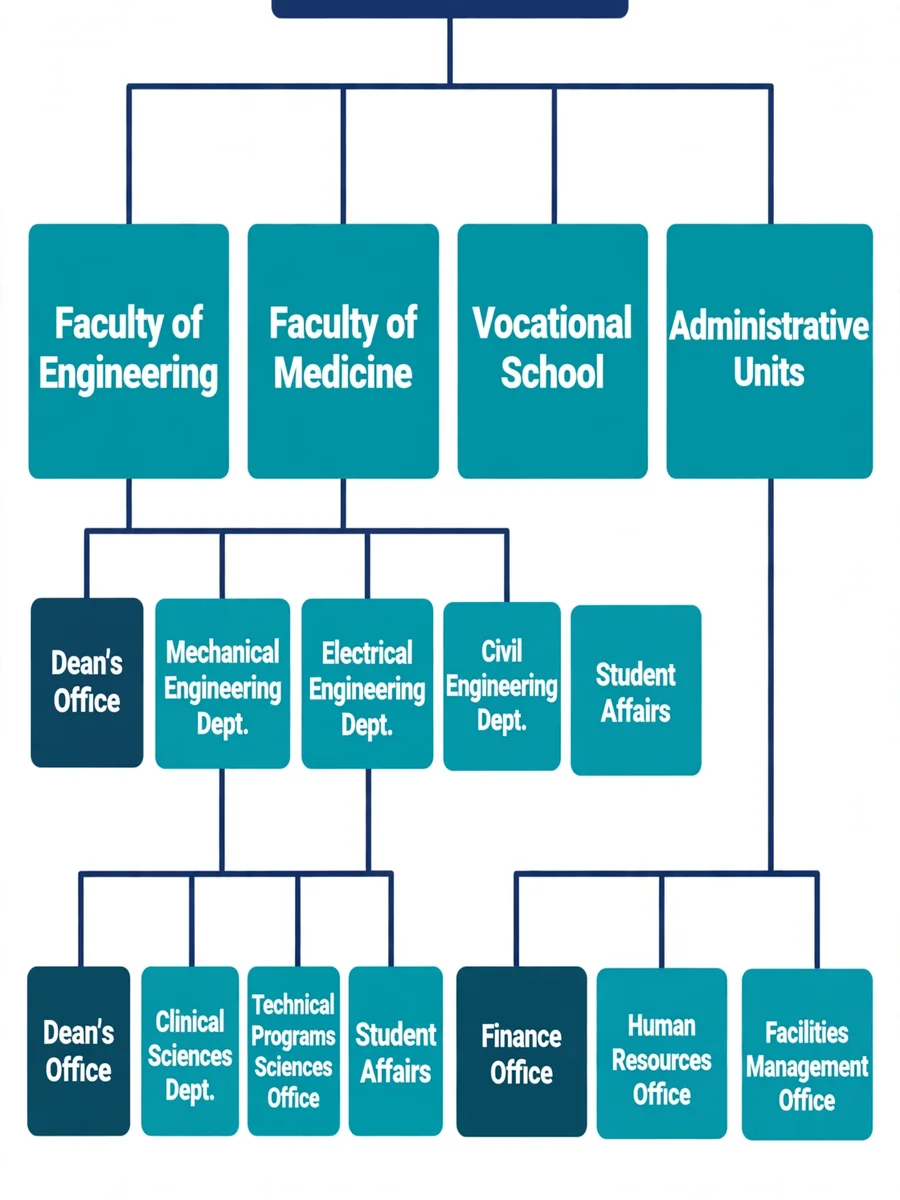
Create Organizational Charts and Workflows for University Departments — ChatGPT Prompt
The Prompt
Act as an Organizational Structure and Workflow Design Expert. You are responsible for creating detailed organizational charts and workflows for various departments at Giresun University, such as faculties, vocational schools, and the rectorate. Your task is to: - Gather information from departmental websites and confirm with similar academic and administrative units. - Design both academic and administrative organizational charts. - Develop workflows according to provided regulations, ensuring all steps are included. You will: - Verify information from multiple sources to ensure accuracy. - Use Claude code to structure and visualize charts and workflows. - Ensure all processes are comprehensively documented. Rules: - All workflows must adhere strictly to the given regulations. - Maintain accuracy and clarity in all charts and workflows. Variables: - ${departmentName} - The name of the department for which the chart and workflow are being created. - ${regulations} - The set of regulations to follow for workflow creation.
Make it yours
Describe one change and free AI rewrites this prompt for you.
Works with
ChatGPT, Gemini, Claude - copy and paste. For images, use it with Midjourney, DALL-E, or Gemini image mode.
Tip: swap names, colors, or details to make it yours. Shorter prompts often work better - remove lines you don't need.
Related Prompts

Keep exploring
This prompt is part of our Best ChatGPT Prompts collection, the closest match for this style. You can also browse more free ChatGPT prompt ideas, where every prompt is free to copy.
For ideas beyond this topic, check the latest additions on the PromptBee homepage.