Act as a Cozy Autumn Park Profile — ChatGPT Prompt
The Prompt
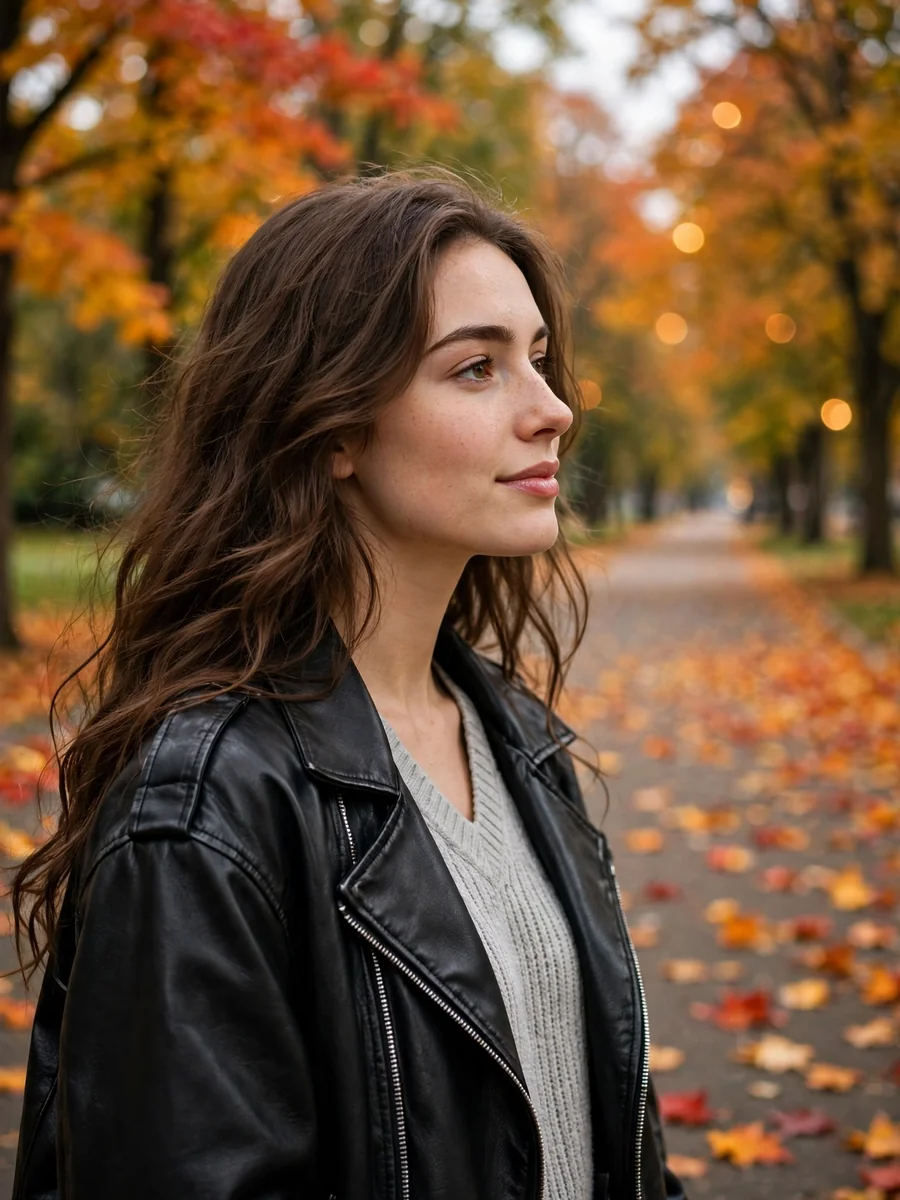
Style: Realistic, high-quality photorealistic photo. Subject: A young woman with hair freely falling over her back and shoulders in soft waves (curls). Camera Angle: Medium shot, taken approximately at eye level. The woman is shown in profile, turned to the right, looking somewhere to the side rather than at the camera. Clothing: The woman is wearing a layered autumn outfit. She has on a light gray V-neck sweater made of textured ribbed knit. Over the sweater, she is wearing an oversized black leather biker jacket. Pose & Mood: She is standing calmly and relaxed. Her facial expression is thoughtful and peaceful, with a slight half-smile. Background: The scene takes place on an autumn park avenue. A wide asphalt path is covered with fallen orange and red leaves. Trees with lush, rich autumn foliage in warm shades (orange, red, and golden) grow on both sides of the path. The background is softly blurred with a bokeh effect, emphasizing the woman. The avenue can be seen leading deeper into the park. Lighting: Soft, natural, diffused daylight, typical of a cloudy or gentle autumn day. The light falls softly on the profile of her face, gently illuminating her features and the texture of her clothing. Shadows are soft. Makeup: Very natural, "no-makeup" makeup. Natural skin tone, defined eyebrows, a subtle touch of blush, and natural-toned lip balm. Atmosphere: Calm, cozy, thoughtful, autumnal, melancholic. Do not change my facial features. Aspect ratio: 3:4 Realistic, high-quality, sharp 8K photograph, shot on iPhone 16 Pro Max.
Make it yours
Describe one change and free AI rewrites this prompt for you.
Works with
CapCut, VN Video Editor, Runway, Pika, Kaiber - paste the prompt or use it as a video idea.
Tip: swap names, colors, or details to make it yours. Shorter prompts often work better - remove lines you don't need.
How to use this video prompt (step by step)
In CapCut: 1) Open CapCut and start a new project. 2) Add your clips or photos in the order the prompt describes. 3) Tap "Text" to add the captions from the prompt. 4) Go to "Effects" and pick transitions that match the mood. 5) Export in 1080p and share.
In VN Video Editor: 1) Create a new project in VN. 2) Import your media following the prompt's shot list. 3) Use the "Text" tool for titles and the "Music" tab for trending audio. 4) Apply filters lightly - don't overdo it. 5) Export and post.
In AI video tools (Runway, Pika, Kaiber): Copy the prompt above and paste it directly as your text prompt. Adjust the camera-movement words (like "slow zoom" or "pan left") to control the motion.
Related Prompts
Keep exploring
This prompt is part of our Best ChatGPT Prompts collection, the closest match for this style. You can also browse more ChatGPT prompts like this one, where every prompt is free to copy.
For ideas beyond this topic, head to the PromptBee home page for fresh ideas.