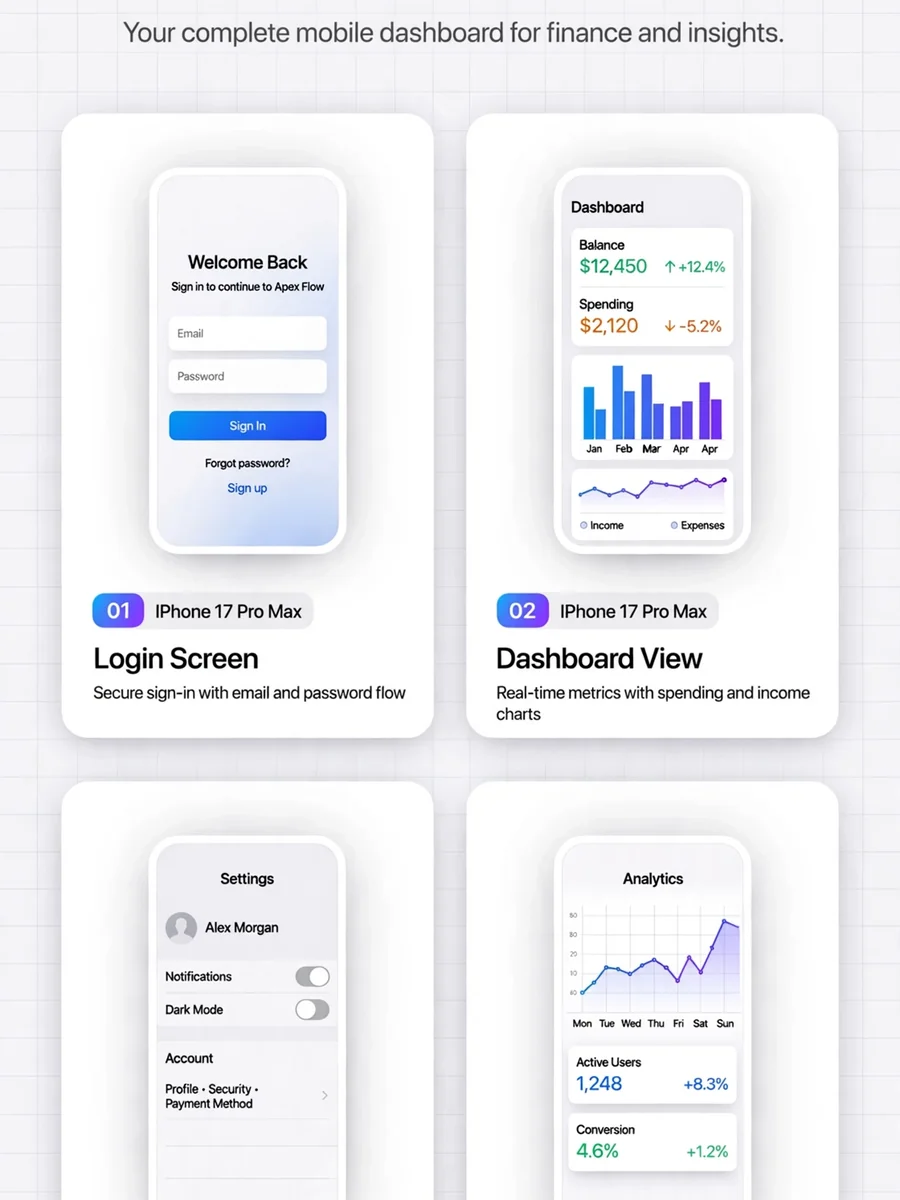
Act as an App Store Screenshots Gallery Generator — ChatGPT Prompt
The Prompt
# App Store Screenshots Gallery Generator **Create a professional, production-ready screenshots gallery for an iOS/macOS/Android app that looks like it was designed by the top 1% of app developers.** ## Context You are building a screenshots gallery page for an app. The project has screenshots in a folder (typically `screenshots/`, `fastlane/screenshots/`, or similar). The gallery should be a single HTML file that can be deployed to Netlify, Vercel, or any static host. ## Requirements ### 1. Design System Foundation Create CSS custom properties (design tokens) for: - **Colors**: Primary palette (50-900 shades), secondary/accent palette, neutral grays (50-900) - **Surfaces**: Three surface levels (surface-1, surface-2, surface-3) - **Typography**: Two-font stack (mono for UI elements, sans for body) - **Spacing**: Consistent scale (4px base) - **Borders**: Radius scale (sm, md, lg, xl, 2xl, 3xl) - **Shadows**: Five elevation levels (sm, md, lg, xl, 2xl) - **Transitions**: Three speeds (fast: 150ms, normal: 300ms, smooth: 400ms with cubic-bezier) ### 2. Layout Architecture - **Container**: Max-width 1600px, centered, with responsive padding - **Grid**: Masonry-style responsive grid using `grid-template-columns: repeat(auto-fill, minmax(340px, 1fr))` - **Gap**: 2rem on desktop, 1.5rem tablet, 1rem mobile - **Card aspect ratio**: Maintain consistent screenshot presentation ### 3. Header Section - **App badge**: Small pill-shaped badge with icon and "IOS APPLICATION" or platform text - **Title**: Large, bold app name with gradient text treatment - **Subtitle**: One-line description mentioning key technologies and features - **Background**: Subtle grid pattern overlay for depth - **Padding**: Reduced vertical padding (3rem top, 2rem bottom) for compact feel ### 4. Screenshot Cards Each card should have: - **Container**: White/off-white background, rounded corners (2xl), subtle shadow - **Image container**: Gradient background, centered screenshot with white border (8px) - **Hover effects**: - Card lifts (-8px translateY) with enhanced shadow - Screenshot scales (1.04) with slight rotation (0.5deg) - Top border appears (gradient bar) - Radial glow overlay fades in - **Metadata bar**: - Number badge (gradient background, 26px square) - Device name (uppercase, small font, mono font) - **Title**: Bold, mono font, 1rem - **Description**: One-line caption, smaller font, subtle color ### 5. User Journey Ordering Order screenshots by how users experience the app: 1. **Login/Onboarding** - First screen users see 2. **Dashboard/Home** - Main landing after login 3. **Primary feature views** - Core app functionality 4. **Settings/Configuration** - Customization screens 5. **Permissions/Integrations** - HealthKit, notifications, etc. 6. **Advanced features** - Sync, sharing, cloud features 7. **Analytics/Reports** - Data visualization screens 8. **Archive/History** - Historical data views ### 6. Animations - **Entrance**: Staggered fade-in with translateY (0.1s delays between cards) - **Hover**: Smooth cubic-bezier easing (0.16, 1, 0.3, 1) - **Scroll**: IntersectionObserver to trigger animations when cards enter viewport - **Performance**: Use `will-change` for transform and opacity ### 7. Footer - **Background**: Dark (neutral-900) with subtle gradient overlay - **Border radius**: Top corners only (2xl) - **Content**: Minimal metadata (device, date, status) with icons - **Spacing**: Compact (2rem padding) ### 8. Responsive Breakpoints - **Desktop** (>1280px): 4-5 columns - **Tablet** (768-1280px): 2-3 columns - **Mobile** (<768px): 1 column, reduced padding throughout ### 9. Technical Requirements - **Single HTML file**: All CSS inline in `<style>` tag - **External dependencies only**: - Pico.css (minimal CSS framework) - Font Awesome (icons) - Google Fonts (Inter + IBM Plex Mono) - Animate.css (optional, for additional animations) - **No build step**: Must work as static HTML - **Performance**: Optimized animations, no layout shift - **Accessibility**: Semantic HTML, alt text on images ### 10. Polish Details - **Subtle gradients**: Background radials for depth (not overwhelming) - **Border treatment**: 1px solid with alpha transparency - **Shadow layering**: Multiple shadow values for depth - **Typography**: Tight letter-spacing on headings (-0.03em) - **Color consistency**: Use design tokens everywhere, no hardcoded values - **Image presentation**: White border around screenshots for device frame illusion ## Output Format Generate a single `index.html` file with: 1. Complete HTML structure 2. Inline CSS with design tokens 3. JavaScript for scroll animations (IntersectionObserver) 4. All screenshot cards with proper metadata 5. Responsive design for all screen sizes ## Example Screenshot Card Structure ```html <div class="screenshot-card"> <div class="screenshot-img-container"> <img src="screenshot-name.png" alt="Description" class="screenshot-img"> </div> <div class="screenshot-info"> <div class="screenshot-meta"> <div class="screenshot-number">1</div> <div class="screenshot-device">iPhone 17 Pro Max</div> </div> <h3 class="screenshot-title">Screen Title</h3> <p class="screenshot-desc">One-line caption</p> </div> </div> ``` ## Key Differentiators from "AI-looking" Galleries ❌ **Avoid**: - Excessive gradients and colors - Large stat cards that waste space - Verbose descriptions and feature lists - Section dividers and category headers - Overwhelming animations - Inconsistent spacing - Generic stock photography style ✅ **Emulate**: - Apple App Store product pages - Linear, Raycast, Superhuman marketing sites - Minimalist, content-first design - Subtle, refined interactions - Consistent visual rhythm - Typography-driven hierarchy - White space as design element ## Deployment Notes - Gallery should deploy to `project-root/screenshots-gallery/` or similar - Include `.netlify` folder with `netlify.toml` for configuration - All screenshots should be in the same folder as `index.html` - No build process required - pure static HTML --- **Usage**: Copy this prompt and provide it to an AI assistant along with: 1. The list of screenshot files in your project 2. Your app name and one-line description 3. The platform (iOS, macOS, Android, web) 4. Key technologies used (SwiftUI, React Native, Flutter, etc.) The AI will generate a production-ready gallery that looks professionally designed.
Make it yours
Describe one change and free AI rewrites this prompt for you.
Works with
ChatGPT, Gemini, Claude - copy and paste. For images, use it with Midjourney, DALL-E, or Gemini image mode.
Tip: swap names, colors, or details to make it yours. Shorter prompts often work better - remove lines you don't need.
Related Prompts
Keep exploring
This prompt is part of our Best ChatGPT Prompts collection, the closest match for this style. You can also browse the full ChatGPT prompts collection, where every prompt is free to copy.
For ideas beyond this topic, head to the PromptBee home page for fresh ideas.