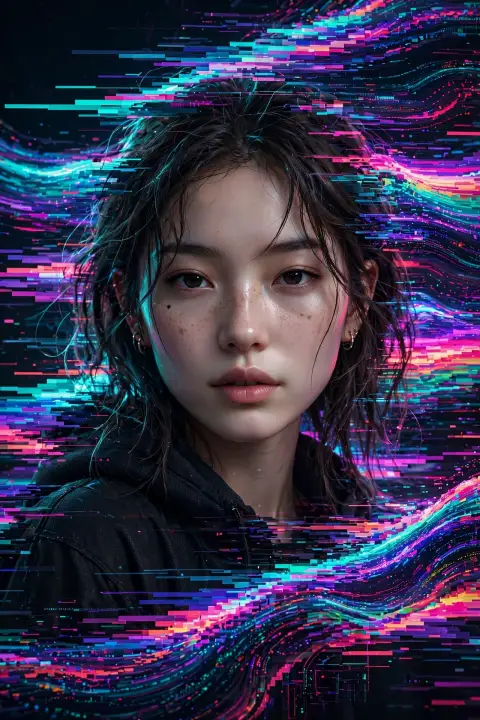
Aesthetic Pixel Stretch Art Prompt
The Prompt
Ultra-cinematic pixel stretch artwork while keeping the main subject 100% sharp, highly detailed, and instantly recognizable. Preserve every facial feature, texture, expression, clothing detail, and lighting with perfect realism. Extract colors, textures, and fine details from the subject, transforming them into long, elegant pixel-stretch ribbons that flow naturally with graceful curves and dynamic motion, as if the subject is dissolving into streams of light, silk, paint, or pure energy. Create flawless, seamless transitions between the original subject and the stretched pixels with no glitches, harsh edges, or distortion. Use dramatic cinematic lighting with golden-hour rim light, volumetric light rays, soft atmospheric haze, realistic depth of field, subtle motion blur, HDR color grading, deep shadows, vibrant highlights, and premium filmic contrast. Add luxurious color harmony with rich blacks, glowing accents, and breathtaking visual depth. Compose the artwork using modern minimalist aesthetics with abundant negative space for maximum visual impact. Inspired by high-end Adobe Photoshop pixel-stretch techniques, luxury digital art, Hollywood movie posters, and premium gallery exhibitions. Hyper-realistic textures, ultra-sharp focus, 8K resolution, masterpiece quality, award-winning digital artwork, visually stunning, social-media-ready, cinematic, elegant, futuristic, and unforgettable.
Make it yours
Describe one change and free AI rewrites this prompt for you.
Works with
CapCut, VN Video Editor, Runway, Pika, Kaiber - paste the prompt or use it as a video idea.
Tip: swap names, colors, or details to make it yours. Shorter prompts often work better - remove lines you don't need.
How to use this video prompt (step by step)
In CapCut: 1) Open CapCut and start a new project. 2) Add your clips or photos in the order the prompt describes. 3) Tap "Text" to add the captions from the prompt. 4) Go to "Effects" and pick transitions that match the mood. 5) Export in 1080p and share.
In VN Video Editor: 1) Create a new project in VN. 2) Import your media following the prompt's shot list. 3) Use the "Text" tool for titles and the "Music" tab for trending audio. 4) Apply filters lightly - don't overdo it. 5) Export and post.
In AI video tools (Runway, Pika, Kaiber): Copy the prompt above and paste it directly as your text prompt. Adjust the camera-movement words (like "slow zoom" or "pan left") to control the motion.
Related Prompts

Keep exploring
Want more in this style? Browse the full Video prompts collection — every prompt there is free to copy and use.
For ideas beyond this topic, check the latest additions on the PromptBee homepage.